

Built into the tools you post with
Your reels keep it fresh
Publish with reelport and your newest reels show up on the page by themselves, from the channels you pick.
No cut of your sales
Sell downloads, bookings, courses and memberships, and take tips, through your own Stripe account.
Stats without cookies
Views, clicks, click rate, countries and sales per block and campaign. No cookie banner for your visitors, hosted in the EU.
An audience that stays yours
Email sign-ups with double opt-in, a welcome mail and broadcasts, a CSV any time, and straight into reelport Chat for DMs.
A page that sells
- Shop, bookings, courses and memberships
- Email sign-ups and mail to your audience
- Cookie-free stats and a tracked QR code
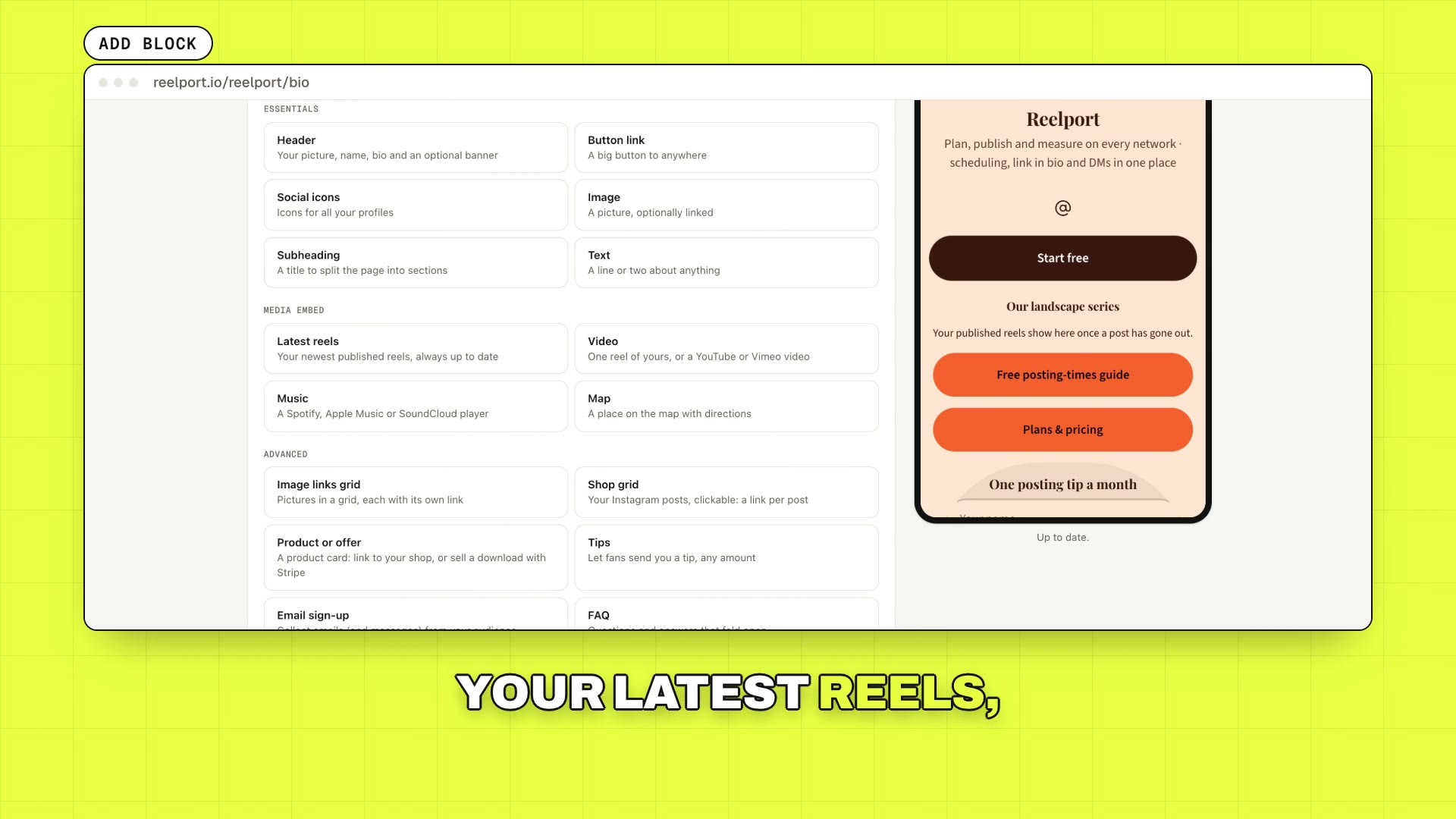
Everything a page needs, as blocks
Essentials
- Header.Your picture, name, bio and an optional banner
- Button link.A big button to anywhere
- Social icons.Icons for the profiles you pick
- Subheading.A title to split the page into sections
- Text.A line or two about anything
- Announcement.A highlighted announcement, with an optional link
- Link list.Several small links in one compact list
- Divider.A line, dots or space between sections
- Quote.A big quote, yours or someone else’s
- Swipe cards.A row of cards people swipe through, each with its own link
- Steps.How it works, in numbered steps
- Checklist.A list with checkmarks: what’s included, what you get
- Timeline.Your story or a project, milestone by milestone
- Call to action.A bold card with a headline and one big button
- Button grid.Small buttons two by two
- Big headline.One big line of text to open a section
- Features.What makes you different, each with an emoji
- Facts.Key facts as a tidy table: gear, specs, details
Media
- Latest reels.Your newest published reels, from the channels you pick
- Video.One reel of yours, or a YouTube or Vimeo video
- Image.A picture, optionally linked
- Image links grid.Pictures in a grid, each with its own link
- Shop grid.Your Instagram posts, clickable: a link per post
- Music.A Spotify, Apple Music or SoundCloud player
- Articles.Your latest articles, issues or episodes, with dates
Sell
- Product or offer.A product card: link to your shop, or sell a download with Stripe
- Tips.Let fans send you a tip, any amount
- Discount code.A code to copy, with a link to your shop
- Media kit.Your followers, reach and engagement from Insights, for brands
- Booking.Paid calls or sessions: they pay, then you meet (or a free calendar link)
- Course.Sell lessons: buyers get a private page with your videos and notes
- Membership.A monthly or yearly membership; members open your members-only links
- Countdown.Time left until a launch, a sale or a drop
- Price list.Your services or menu with prices
- Goal.A progress bar towards a goal: a fundraiser, a launch, a milestone
- App download.App Store and Google Play buttons for your app
- Packages.Two or three packages side by side, each with what’s included and a button
- My gear.The camera, drone and apps you use, with your (affiliate) links
Social proof
- Testimonials.What clients and fans say about you
- Numbers.A few big numbers: followers, clients, years
- Rating.Your star rating and number of reviews, linked to where they are
- Worked with.Brands and clients you’ve worked with
- Press.What the press wrote about you, with links to the articles
- Team.The people behind it, with their roles
- Awards.Prizes, features and certificates
- Skills.What you’re good at, with a bar each
Contact and events
- Email sign-up.Collect emails (and messages) from your audience
- Contact card.Your details as a card people save to their phone
- Event.A date, place and tickets, with “add to calendar”
- Map.A place on the map with directions
- FAQ.Questions and answers that fold open
- Message me.WhatsApp, Telegram, Messenger, Signal, SMS or email buttons
- Opening hours.When you’re open, day by day
- Availability.Open for work, a few spots left or fully booked
- Tour dates.Tour or workshop dates with tickets, and what’s sold out
- Locations.Several places, each with directions
- Schedule.When you stream, post or teach, week by week
More than a list of links
Start fast
12 starting templates and 50+ blocks. Or let AI write the page for you, or import your links from Linktree, Beacons or Stan.
Sell and book
Shop grid, product cards and paid blocks, paid calls or a free calendar link, courses with private lesson pages, and memberships with members-only blocks.
Collect leads
Lead forms and email sign-ups that sync to Kit, Mailchimp, beehiiv or a webhook. Audience mail caps grow with your plan.
Grow from your posts
A “send this link by DM” button for comment-to-DM, a media kit block with your followers, reach and engagement from Insights, and an A/B test for any button.
Link in Bio in 31 seconds
Blocks, themes, a shop, tips, cookie-free stats and a tracked QR code, in the real app.
In every plan
Link in Bio comes with every reelport plan, Free included. Prices in USD, tax added at checkout.
| Plan | Price | Pages | reelport footer |
|---|---|---|---|
| Free | Free | 1 | Shown |
| Creator | $15/mo | 3 | Removable |
| Pro | $39/mo | 10 | Removable |
| Agency | $99/mo | 50 | Removable |
Questions
- What does Link in Bio cost?
- It's included in every reelport plan. Free has one page with the reelport footer; Creator and up remove the footer and add more pages.
- Where does my page live?
- At reep.li/yourname, served from the EU without cookies or third-party requests.
- Can I move my page from Linktree, Beacons or Stan?
- Yes. Paste your page’s address and reelport imports the links into a new page you can edit.
- Can I email the people who sign up?
- Yes. Sign-ups confirm by double opt-in, then get your welcome mail and your broadcasts. How many mails you can send a month depends on your plan.
- Can I sell on it?
- Yes. Connect Stripe once, then sell downloads, paid calls, courses and memberships, or take tips. Download buyers get their file by email; course buyers get a private page with the lessons.
- Do I need to use reelport for publishing?
- No. Link in Bio works on its own. If you also publish with reelport, your latest reels fill the page for you.