
WhatsApp automation for small business comes in two sizes. The free WhatsApp Business app sends a fixed greeting and an away message from your phone. Menus, keyword replies, AI answers, reminders and broadcasts need the WhatsApp Business Platform, connected through an automation tool. On the Platform, Meta has charged per delivered message since 1 October 2026 for almost everything, with the first 1,000 replies a month per number free, so the design of your flows now decides your bill.
What is WhatsApp automation for small business, and which version do you need?
WhatsApp automation is software answering or sending WhatsApp messages for your business without someone typing each one. If you get a handful of chats a day and only want to say "we are closed, back at 9", the free app is enough. If customers should pick from a menu, book, or get reminders, you need the Platform.
| WhatsApp Business app | WhatsApp Business Platform (API) | |
|---|---|---|
| Price | Free, and messages you send from the app stay free | Meta charges per delivered message, plus the tool you connect |
| Automatic replies | Greeting message, away message, each one fixed text | Flows with keywords, buttons, conditions, AI replies, hand-over to a person |
| Saved answers | Quick replies you pick by hand | Sent by the automation |
| Reminders and offers to people who have not written today | By hand | Approved message templates, sent by the tool |
| Where it runs | Your phone | A server, around the clock |
| Your number | The one in the app | A number that is not active in the WhatsApp app (see setup) |
A simple rule: stay on the app until you answer the same three questions more than about ten times a day, or until missed reminders cost you appointments. Then move to the Platform.
What does WhatsApp automation cost since October 2026?
Meta charges per delivered message, and the rate depends on the message category and the country code of the recipient. Since 1 October 2026 free-form replies ("service" messages) are charged from the 1,001st per month and number, and utility templates are charged even inside an open chat. Meta does not charge for messages that customers send to you.
The rules, each from Meta's pricing documentation:
| Message | What it is | When you can send it | Charge |
|---|---|---|---|
| Service | Any free-form reply, typed by you or sent by a bot | Only within 24 hours of the customer's last message | First 1,000 delivered per month and phone number free, then charged. Unused free messages do not roll over |
| Utility template | Confirmation, reminder or update the customer asked for | Any time | Charged. Until 30 September 2026 it was free inside the 24-hour window |
| Marketing template | Offers, news, anything promotional | Any time | Charged, at the highest of the three rates in the table below |
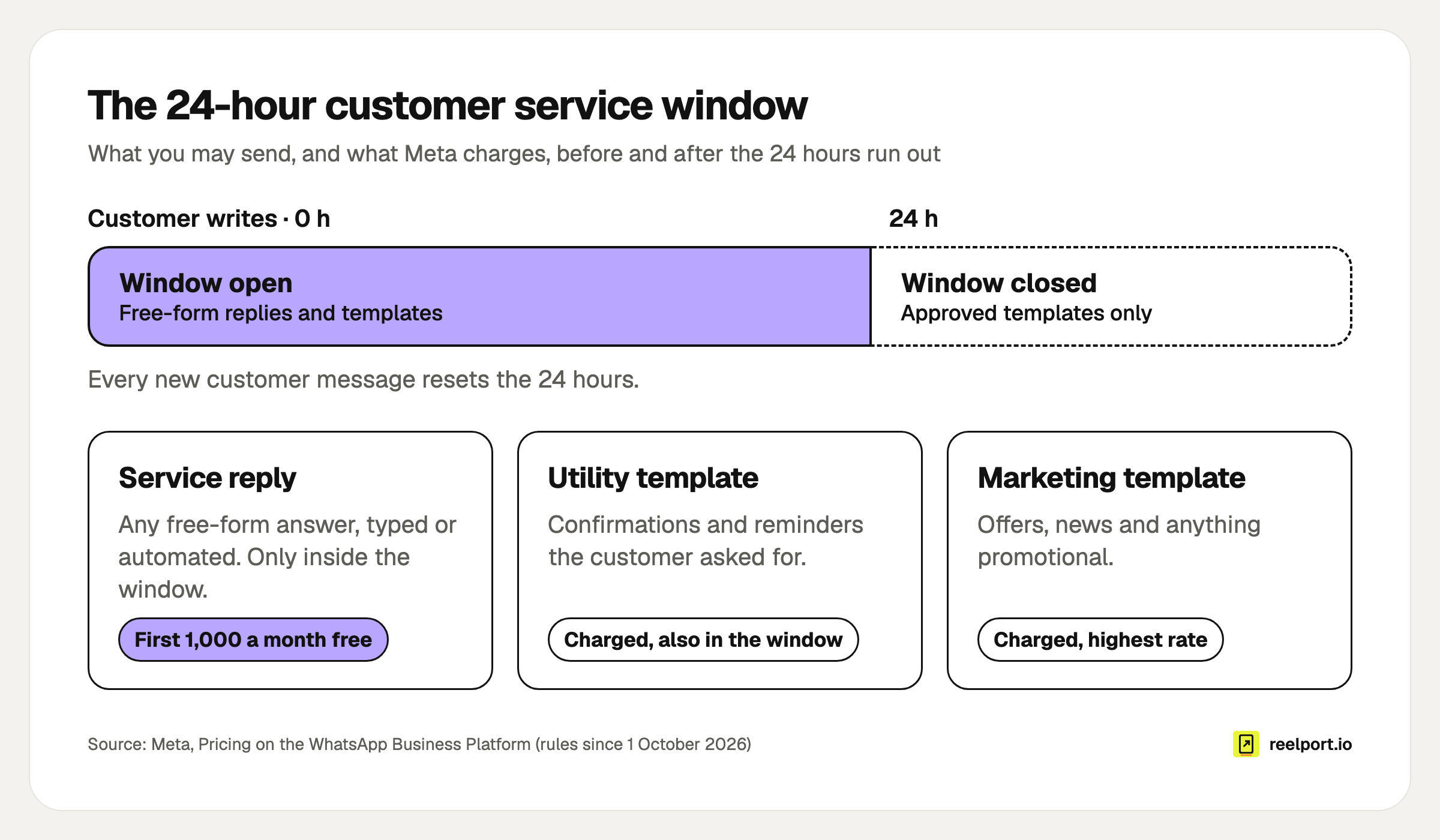
The 24-hour window decides what you may send; the category decides what it costs.
List rates in euros from Meta's EUR rate card, effective 1 October 2026 and linked under rate cards and volume tiers, checked in November 2026:
| Recipient's market | Marketing | Utility | Service (after the free 1,000) |
|---|---|---|---|
| Germany | €0.1131 | €0.0456 | €0.0456 |
| United Kingdom | €0.0526 | €0.0182 | €0.0182 |
| Rest of Western Europe | €0.0490 | €0.0142 | €0.0142 |
| North America | €0.0207 | €0.0028 | €0.0028 |
"Rest of Western Europe" covers Austria, Belgium, Denmark, Finland, Ireland, Norway, Portugal, Sweden and Switzerland. "North America" is Canada and the United States, and WhatsApp currently does not deliver marketing templates to US numbers at all (per-user limits). Meta may change rates on the first day of each quarter, so look up your market before you budget. Volume discounts exist for utility and authentication only, and the first utility tier ends at 80,000 messages a month in North America and 100,000 in the other three markets, so a small business pays list rates.
Two details that save money:
- Click-to-WhatsApp ads open a free window. If someone writes to you from such an ad in the WhatsApp app on a phone and you answer within 24 hours, Meta opens a free entry point window of up to 7 days in which service, utility and marketing messages to that person are free.
- Some tools add their own fee per message. Ask before you sign. With reelport Chat, Meta bills you for the messages and the plan has no per-contact fee.
How much is a real monthly bill?
For a local business with a few hundred chats a month, expect Meta fees between about €50 and €110 at German rates, and less than half of that at UK rates. Most of it comes from two choices: how many separate messages your bot sends per chat, and how many people get your marketing template.
A worked example with an invented salon, Studio Nord, whose customers all have German numbers:
| Automation | Volume in a month | Calculation | Cost |
|---|---|---|---|
| Replies in customer-started chats | 600 chats × 3 replies = 1,800 service messages | (1,800 − 1,000 free) × €0.0456 | €36.48 |
| Appointment reminders | 400 utility templates | 400 × €0.0456 | €18.24 |
| Monthly offer | 500 marketing templates | 500 × €0.1131 | €56.55 |
| Total | €111.27 |
Now the same salon after three cuts:
- Merge bubbles. The bot sent a greeting, then a menu, then the answer. Greeting and menu become one message, so a chat takes 2 replies: 1,200 service messages, of which 200 are charged. €9.12.
- Leave reminders alone. They prevent no-shows and cost €18.24.
- Send the offer to recent customers only. 200 people who booked in the last three months, not all 500 contacts. €22.62.
New total: €49.98, which is €61.29 less each month for the same service.
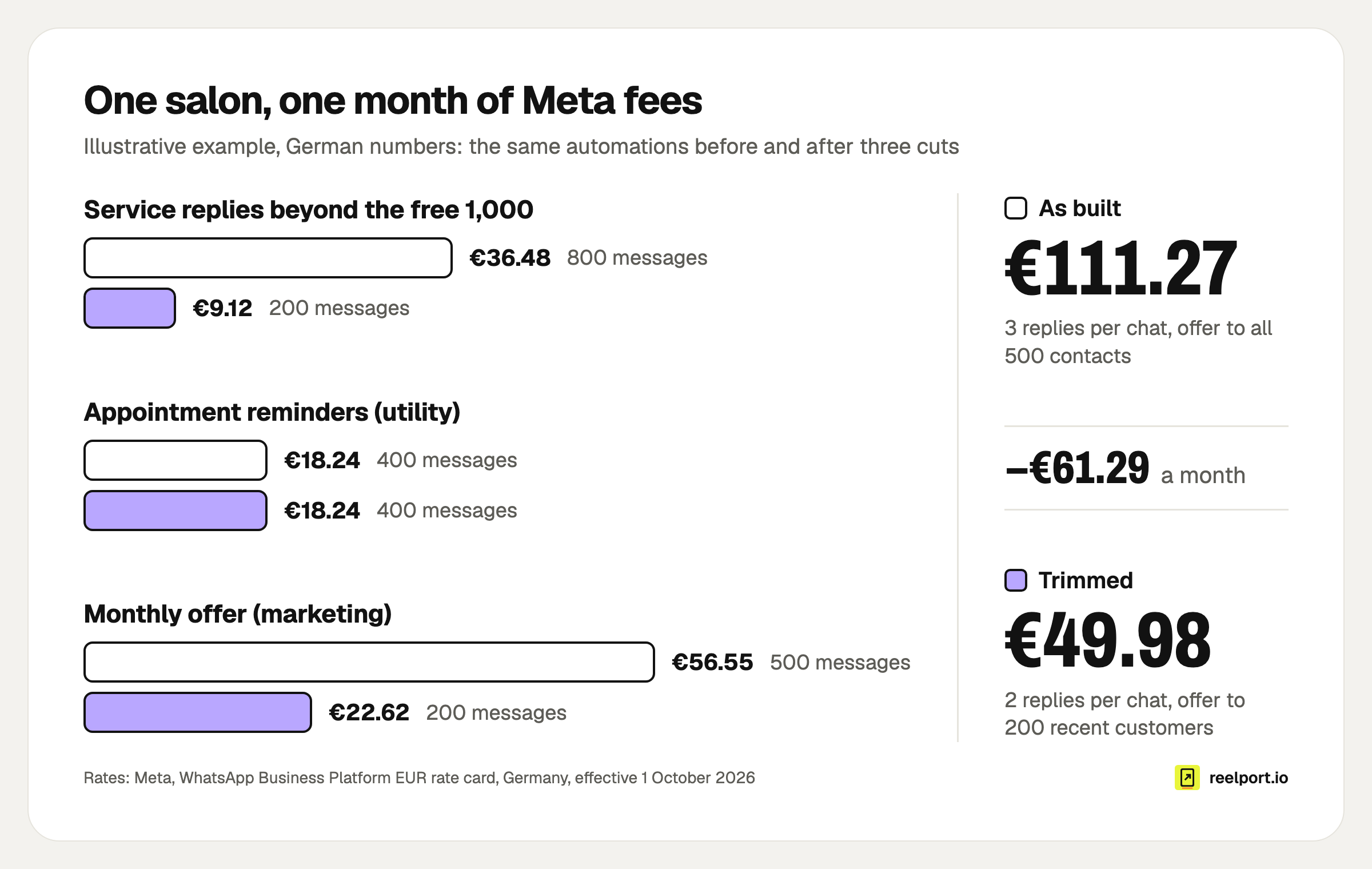
Illustrative example: fewer bot bubbles and a smaller offer audience cut the bill by €61.29 a month.
A typed answer counts the same as a bot reply, so three short messages in a row use up the free 1,000 three times as fast as one.
What should a small business automate first?
Start with the chats that are frequent and harmless: questions with one right answer, and messages the customer is waiting for. Leave complaints, refunds and anything about money or health to a person, and let the bot only collect the details before it hands over.
| Build order | Automation | Trigger | Category | Why first |
|---|---|---|---|---|
| 1 | Menu on first contact: hours, prices, address, "talk to us" | Any message | Service | Answers most chats inside the free 1,000 |
| 2 | Away reply that collects name and request | Message outside business hours | Service | Nobody waits without knowing when you answer |
| 3 | Booking request | Keyword or menu button | Service | Captures day, time and service in one go |
| 4 | Appointment or pickup reminder | Your booking, a day before | Utility template | The one paid message that earns its cost |
| 5 | Monthly offer | Your schedule | Marketing template | Only to people who opted in, only if it sells |
How do you set up WhatsApp automation, step by step?
You need a spare phone number, a Meta business portfolio with a payment method, and a tool that connects to the Platform. Plan one afternoon, plus up to a day of waiting for template review.
- Choose the number. A number that is already in use with WhatsApp cannot be registered on the Platform unless it is deleted there first. The easiest route is a second number. It has to receive an SMS or a voice call once for verification, so a landline works with the call option.
- Create the WhatsApp Business Account in your Meta business portfolio and add a payment method. Without one, Meta delivers only the free 1,000 service messages a month and stops delivering them once those are used.
- Start business verification. A new portfolio may message 250 different people per 24 hours outside open chats. Verification is one of the routes to 2,000; after that the limit rises automatically to 10,000, 100,000 and unlimited when your message quality is good and you use at least half of it. Replies inside open chats do not count.
- Connect the tool. In reelport Chat that is Channels, then Connect on WhatsApp, then Meta's own window. WhatsApp needs the Chat Growth tier, which is part of the Pro plan (pricing).
- Build the menu flow with the trigger "any message", publish it and write to the number from a private phone.
- Set business hours, the away text and the words that mean "human". WhatsApp's business policy allows automation in the 24-hour window only if customers get a prompt and clear way to reach a person: an agent in the chat, a phone number, email, a support form or your shop.
- Submit your templates in WhatsApp Manager. A decision can take up to 24 hours.
- Watch the first 50 chats yourself and fix every place where people got stuck.
Ready-made flows for steps 5 and 6 are in the automation templates: FAQ menu with AI fallback, Booking request, Out-of-office reply and Order status.
Which scripts can you copy?
Change the bracketed parts and keep the structure. The template texts are written so they pass review: variables sit in the middle of a sentence, and the reminder contains nothing promotional.
Opt-in line (booking form, counter sign, website). Meta requires that it names your business and says the person is opting in to messages:
[ ] Yes, [Studio Nord] may send me appointment reminders on WhatsApp.
[ ] Yes, [Studio Nord] may also send me offers on WhatsApp, at most once a month.
I can stop either at any time by replying STOP.
First-contact menu (service, one message):
Hi, this is [Studio Nord]. What can we help with?
1 Opening hours and address
2 Prices
3 Book an appointment
4 Talk to the team
Reply with a number.
Away reply (service):
We are closed right now and back [Tuesday at 9:00]. Tell us your name and what you need in one message, and we will answer first thing.
Reminder (utility template):
Hello {{1}}, this is a reminder of your appointment at [Studio Nord] on {{2}} at {{3}}. Reply 1 to confirm or 2 to reschedule.
Offer (marketing template):
Hello {{1}}, in [December] every [colour appointment] at [Studio Nord] includes a free [care treatment]. Reply BOOK for free slots or STOP to get no more offers.
How do you get opt-in right in the EU?
WhatsApp requires opt-in before you message someone first, and leaves the method to you. In the EU, GDPR adds two duties when you rely on consent: you must be able to prove it, and withdrawing it must be as easy as giving it (Article 7). This is a working checklist, not legal advice.
- One unticked box per message type: reminders and offers separately, as Meta's own best practice says.
- The wording names your business and WhatsApp.
- You store who agreed, when, where and to which wording.
- STOP works in every chat and is honoured at once. reelport Chat stops automated messages to anyone who sends STOP until they send START.
- Your privacy notice mentions WhatsApp and the tool you use.
- You have a data processing agreement with the tool (Article 28); reelport.io's is at /dpa.
- The bot asks for nothing it does not need. No health details, no ID numbers.
One thing an EU-hosted tool cannot change: the messages themselves travel through Meta's WhatsApp. What you choose is where contacts, tags and chat history are kept, which is the part covered in our guide to GDPR-compliant social media tools.
What goes wrong, and how do you fix it?
Most failures trace back to the 24-hour window, the template category or an account limit. Find your symptom in the left column.
| Symptom | Cause | Fix |
|---|---|---|
| The number cannot be registered | It is still active in the WhatsApp or WhatsApp Business app | Use a second number, or delete the account in the app first |
| Bot replies stop reaching customers partway through the month | The free 1,000 service messages are used up and the WhatsApp Business Account has no payment method | Add one in Meta's billing settings |
| A follow-up after a two-day wait never arrives | The 24-hour window closed, free-form messages are blocked | Keep waits under 24 hours or send an approved template |
| A reminder is billed at the marketing rate | The template contains an offer; Meta moves such templates to marketing, usually with one day's notice | Remove the promotional line and put it in its own template |
| A template is rejected | Variable at the start or end, broken {{1}} numbering, or the same text as an existing template | Fix and resubmit, or appeal; appeals are decided within 24 hours |
| A broadcast stops after 250 people | Messaging limit of a new portfolio | Verify the business, then let the limit rise with use |
| An offer fails with error 131049 | WhatsApp limits how many marketing templates one person receives from all businesses | Wait at least 24 hours before trying that person again |
Where reelport.io fits
reelport Chat runs WhatsApp next to Instagram DMs, Messenger, Telegram and a website chat, with one inbox for all of them, so the menu you build for WhatsApp can be rebuilt for Instagram comment-to-DM in the same place. WhatsApp is part of Chat Growth, included in Pro at $49 a month with 30,000 automated DMs a month and no contact limit; Meta's message fees come on top. The same subscription covers publishing, Link in Bio and planning for small businesses, and the 14-day Pro trial needs no card.