
Instagram comment to DM automation sends a direct message to everyone who comments a keyword on your post or Reel. Meta's API allows one such message per comment, within 7 days, and nothing further until the person answers. Everything that works or fails in a comment-to-DM flow follows from that single-message rule, so this guide starts with the limits and builds the setup and the scripts on top of them.
What is Instagram comment to DM automation?
It is a rule that watches the comments on your posts and answers matching ones in private. You write "Comment GUIDE and I'll send it to you" in the caption, someone comments GUIDE, and a tool connected to your account sends them a DM through Meta's Private Replies API. No one has to sit in the inbox.
It exists because typing one word under a post is less effort than leaving the post to look for a link in your bio. The trade-off is that you are now running a messaging flow under Meta's messaging rules, which are stricter than most guides admit.
What does Instagram allow in a comment to DM flow?
One message per comment, sent within 7 days, to a commenter on a public professional account's post. A second message is only possible after the person responds, and then for 24 hours. These limits come from Meta's developer documentation and apply to every tool, because every legitimate tool uses the same API.
| Rule | What Meta's documentation says | Source |
|---|---|---|
| Messages per comment | "Only one message can be sent to the commenter" | Private Replies |
| Deadline | Within 7 days of the comment being made on a post or Reel | Private Replies |
| Instagram Live | Private replies can only be sent during the broadcast | Private Replies |
| Where it lands | Inbox if the person follows you, Requests folder if they do not | Private Replies |
| Follow-ups | Only if the recipient responds, and within 24 hours of the response | Private Replies |
| Volume | 750 private replies per hour per account for posts and Reels; 100 per second for Live comments | Instagram Platform overview |
| Message length | Text of 1,000 bytes or less, in UTF-8 | Messaging API |
| Account type | An Instagram professional account (business or creator) | Instagram Platform overview |
| Account visibility | The account that owns the post must be public; private accounts get no comment notifications | Webhooks setup |
| Message access | "Allow Access to Messages" switched on under Connected Tools | Get started with Instagram Messaging |
Two consequences are easy to miss. A comment does not open a messaging window: Meta's policy overview lists the actions that do, such as the person sending a message, clicking a call-to-action button or reacting to a message, and commenting is not among them. And the 1,000-byte limit is counted in bytes: an umlaut takes two and most emoji take four, so a German message with emoji runs out sooner than its character count suggests.
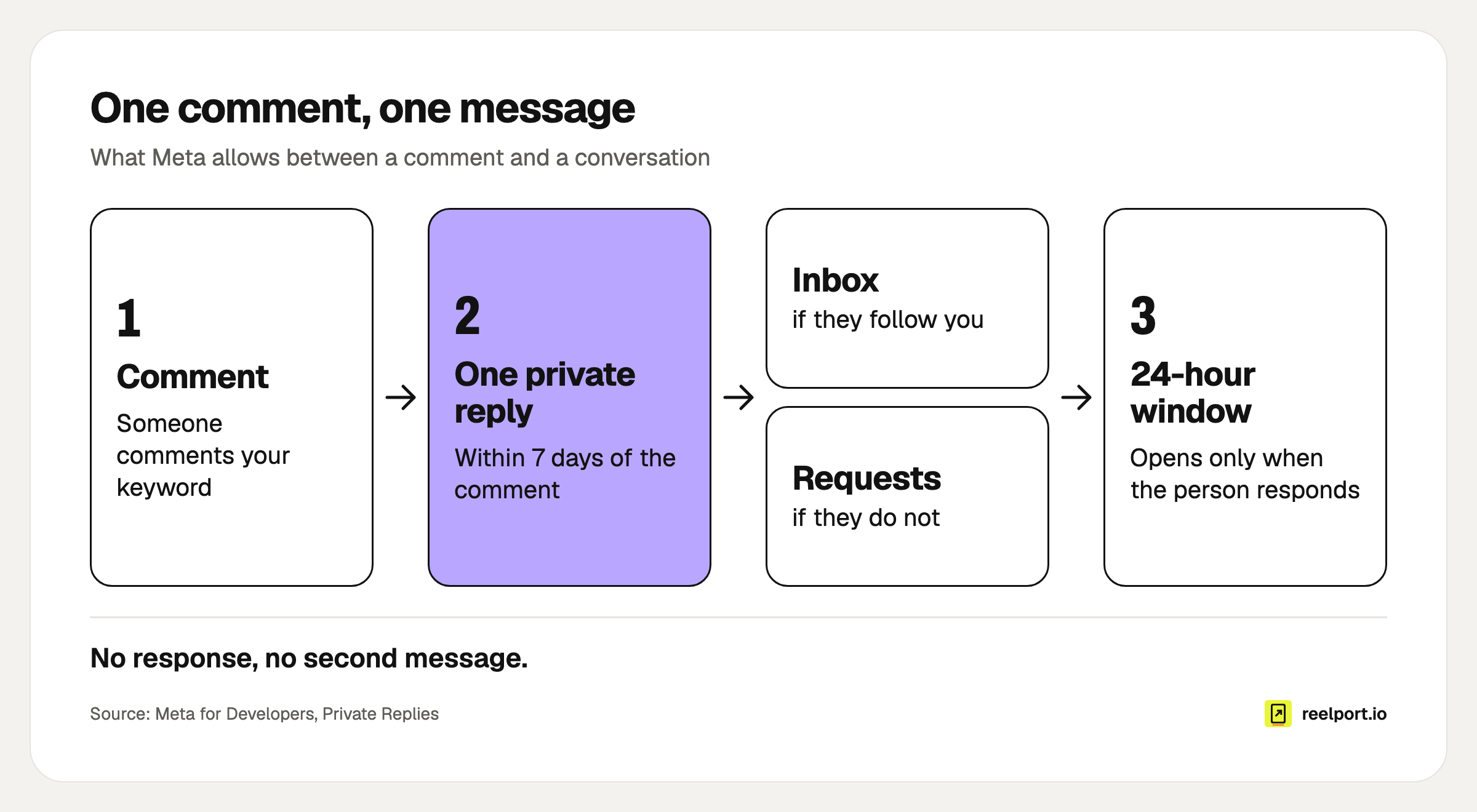
One comment buys one message; the 24-hour window only opens when the person responds.
How do you set up Instagram comment to DM automation?
Prepare the account, connect a tool that uses Meta's official API, create one automation with a comment trigger and a keyword, and test it from a second account before the post goes live. The account settings are where most first attempts fail, so do them first.
- Switch to a professional account and keep it public. Creator or Business both work. A private account receives no comment notifications, so nothing will trigger.
- Allow message access. In the Instagram app: Settings, then Messages and story replies, then Message controls, then Connected Tools, and switch on Allow Access to Messages.
- Connect the account to your tool. In reelport Chat, open Channels, click Connect and choose Continue with Instagram. The channel shows Live when it works.
- Create the automation. Click New automation, pick Instagram and start from the Comment to DM template, or from scratch with the trigger "Comment on a post". The automation templates show the other starting points, such as Lead magnet and Follow gate.
- Choose a keyword people will not type by accident. GUIDE, PLAN or MENU work. YES and LINK also match people talking to each other. Add the obvious misspelling and the lowercase form if your tool matches exactly.
- Write the first message so that it asks for a tap or a reply. You get one message. End it with a button if your tool can attach one to the first reply, or with a question that takes one word to answer. The scripts are in the next section.
- Add a public reply under the comment. It tells the commenter, and everyone reading along, where to look. Write three variants and rotate them so the thread does not fill with one identical line.
- Add the steps that run after the response. Send the link, then ask for the email address or offer the next thing, all inside the 24 hours the response opened.
- Publish and test from a second account. Test once from an account that follows you and once from one that does not. The second test shows you the Requests folder experience your new audience gets.
- Publish the post, then watch the first hour. Check the tool's event log against the comment count. In reelport Chat, Activity lists every event for 14 days, including why an automation did not run.
Timing helps here too: publish when your audience is online, so the keyword comments come in while you are watching the log. The method for finding that hour is in best time to post on Instagram.
What should the messages say?
The first message has to do three jobs in a few lines: confirm why the person is getting it, say that it is automated, and give them one obvious thing to tap. Everything valuable can then follow in the second message, which their tap makes possible. Copy these and replace the brackets.
Caption line
Want the [7-day meal plan]? Comment PLAN and I'll send it to you by DM.
Not following yet? The message lands in your requests folder.
Public replies (rotate)
Sent! Check your DMs (or your message requests).
On its way to your inbox. Look under Requests if you don't follow us yet.
Done, it's in your messages now.
First DM (the one message you are allowed)
Hi [first name], you commented PLAN, so here's your automated reply from [brand].
Tap the button and the [7-day meal plan] is yours.

[ Send me the plan ]
First DM without a button
Hi [first name], you commented PLAN, so here's your automated reply from [brand].
Reply YES and I'll send the [7-day meal plan] right away.
After the tap or the YES
Here it is: [link]
It opens in your browser, no sign-in needed.
Email ask (optional, a minute later)
Want next week's plan too? Reply with your email address and I'll send it
every Sunday. You can unsubscribe in any mail.
If they write something the flow does not understand
I'm an automated assistant and didn't catch that. Write HUMAN and [name]
will answer you personally.
Keep the first DM free of bare links if you can. A link in the only message you may send works for followers, but for non-followers it sits behind the Requests folder, and a link they never see does nothing. The button or the question gives them a reason to open the conversation, and their answer is the response that lets you send the rest. Meta adds a link to the commented post to every private reply, so the person can see what the message refers to.
What happens when a Reel gets 2,000 comments in an hour?
The hourly limit spreads the replies out. At 750 private replies per hour, 2,000 keyword comments in the first hour are answered over three hours: 750 in hour one, 750 in hour two and the remaining 500 in hour three. Nobody is lost as long as your tool queues the overflow, because each comment can be answered for 7 days.
The ceiling over a week is large: 750 × 24 = 18,000 private replies a day, and 18,000 × 7 = 126,000 inside one 7-day window. For almost every account the hourly limit only means a delay on launch day. Ask your tool's support whether it queues or drops replies above the limit.
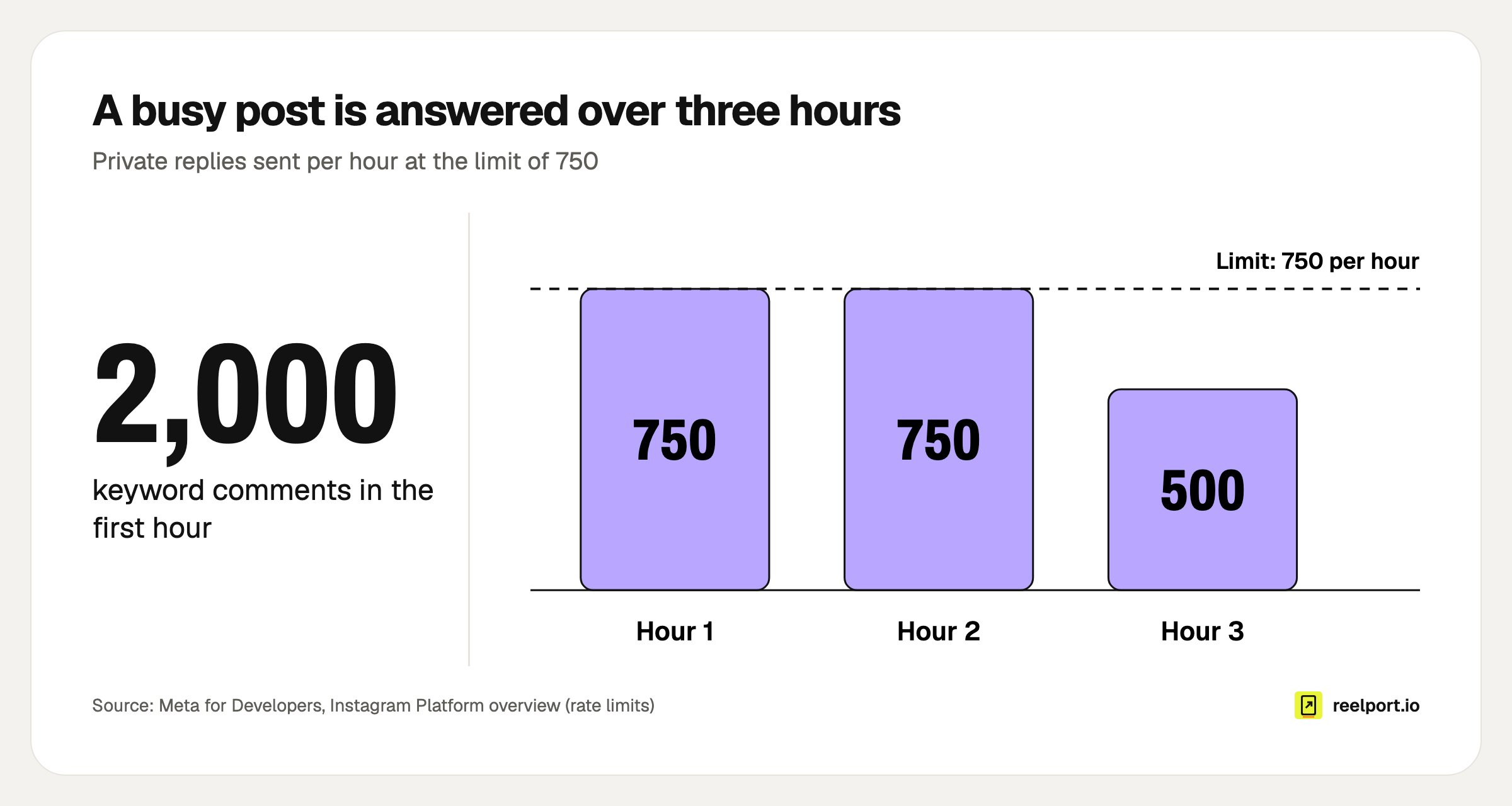
2,000 comments at 750 replies an hour: the last commenter waits until hour three.
The more useful arithmetic is your own funnel. Here is an invented example, all figures illustrative: a Reel collects 600 keyword comments in its first week, 240 from followers and 360 from people who do not follow the account.
| Step | Followers | Non-followers | Total |
|---|---|---|---|
| Keyword comments | 240 | 360 | 600 |
| First DM lands in | Inbox | Requests | |
| Tap the button (70% and 35%) | 168 | 126 | 294 |
| Give their email (50% of taps) | 84 | 63 | 147 |
Out of 600 commenters, 294 receive the link (49%) and 147 join the list (24.5%). The gap between 70% and 35% is the Requests folder. It is also the number you can move: a caption line and a public reply that mention message requests cost nothing. The flow sent 600 first messages, 294 links, 294 email asks and 147 confirmations, 1,335 automated messages in total, which is the figure to hold against your tool's monthly allowance.
Why is my comment to DM automation not working?
Most failures trace back to an account setting or to the one-message rule. Find your symptom in the table, fix the cause, and test again from a second account. If the cause is not listed, your tool's event log is the next place to look.
| Symptom | Likely cause | Fix |
|---|---|---|
| Nothing is sent to anyone | Personal or private account, or message access is off | Switch to Creator or Business, set the account to public, turn on Allow Access to Messages |
| "I commented but got nothing" | The DM is in the person's Requests folder | Mention message requests in the caption and the public reply |
| The link never arrives | The link sits in a second message and the person did not respond to the first | Put a button or a question in the first message; send the link after the response |
| Next-day follow-up is missing | More than 24 hours since the person's last response | Send what matters inside the window; later steps only reach people who write again |
| Comments from before launch get no DM | They are older than 7 days | Nothing to fix; answer those by hand in public |
| Live comments get no DM after the stream | Private replies to Live comments only work during the broadcast | Run the automation while you are live |
| DMs arrive late on a busy post | The 750 per hour limit | Expected; confirm that your tool queues the overflow |
| Message fails to send | Text is over 1,000 bytes | Shorten it; emoji and umlauts use several bytes each |
| Channel shows "Needs reconnect" | The sign-in expired or a permission was removed | Reconnect the account in the tool |
What do EU accounts need to watch?
Say that the reply is automated, and treat an email address collected in a DM like one collected on a form. Meta's policy overview requires automated chats to disclose themselves where the law demands it, at the start of a conversation, and names the German and Californian markets as ones to pay special attention to. It recommends disclosure everywhere else too.
For email addresses, the GDPR puts the proof on you: under Article 7(1) the controller must be able to demonstrate that the person consented, and under Article 7(3) withdrawing has to be as easy as giving consent. A checklist for the flow:
- The first message says it is automated and names your brand.
- The email ask says what will be sent and how often.
- The address is confirmed by a double opt-in mail before the first newsletter.
- Every mail has an unsubscribe link.
- Your privacy policy names the DM tool as a processor, and you have a data processing agreement with it.
- People who write STOP get no further automated messages.
A simple way to get the double opt-in is to send people from the DM to a page that handles it. A Download Page on reep.li hands out the file for a confirmed email address, so the consent record is created there and the DM only carries the link. reelport.io's processing terms are in the DPA.
Where reelport.io fits
reelport Chat is the DM automation part of reelport.io and is included in every paid plan, starting with Creator at $19 a month. The Starter tier that comes with Creator covers 3 chat channels and 5,000 automated DMs a month, with no contact limit. It has the Comment to DM template, the "Comment on a post" and "Comment during a Live" triggers, messages with up to 3 buttons, a reply under the comment, email capture, a follow gate and an inbox where your own reply pauses the bot for that person.
Chat runs on Meta's official API and is hosted in the EU. It has no free tier; the 14-day Pro trial needs no card. If you are weighing it against a dedicated chat-marketing tool, the ManyChat comparison lists the differences, and the pricing page has the plan details.