
To sell digital products from your link in bio you need four things: a file worth paying for, a bio page with a checkout on it, a payment account that pays out to you, and automatic delivery by email. The route you pick decides how much of each sale you keep. On a $19 product, the fee models in common use leave you between $16.60 and $18.15 per sale, and the cheapest one at 10 sales a month is not the cheapest at 100.
What do you need to sell digital products from a link in bio?
You need a product file, a page that takes payment, a payment processor and a delivery step that sends the file without you. Almost every tool gives you the same four parts. They differ in who the seller is, who handles tax, and what is taken from each sale.
There are three routes:
| Route | How it works | Who is the seller | What it costs |
|---|---|---|---|
| Checkout on your bio page | The buy button opens a card checkout connected to your own payment account | You | Card processing only, plus the page tool's plan if it has one |
| Marketplace behind the link | Your bio page links out to a product page on a marketplace | The marketplace, as merchant of record | A percentage of each sale |
| Creator store subscription | A storefront replaces your bio page | You | A monthly fee plus card processing |
Real examples of each, with their published prices at the time of writing:
- Card processing: Stripe's US price is 2.9% + 30¢ per successful domestic card transaction, plus 1.5% for international cards and 1% if currency conversion is required. Prices differ by country: Stripe's German page lists 1.5% + €0.25 for standard EEA cards.
- Marketplace: Gumroad charges 10% + $0.50 per transaction on direct sales and 30% on sales that come through its Discover marketplace. In return it acts as merchant of record and says it handles your tax obligations.
- Creator store: Stan's Creator plan is $29 a month or $300 a year, with a 14-day trial, 0% transaction fees and the standard processing fee on top.
- Bio tool with its own fee: Linktree charges a seller fee that depends on your plan, plus Stripe's processing fee, and lists selling digital products on its Pro and Premium plans. Check its pricing page for the current percentage.
What does each fee model cost per sale?
On a $19 product paid with a US card, card processing alone takes $0.85, and a 10% + $0.50 fee takes $2.40. A flat subscription adds nothing per sale but has to be earned back every month. Which is cheapest depends on how many sales you make.
Here is the arithmetic for an illustrative shop: one $19 preset pack, US buyers, US card pricing. The shop and its numbers are an example, not a real account.
Per sale
- Card processing only: $19 × 2.9% = $0.551, plus $0.30 = $0.851. You keep $18.15.
- 10% + $0.50: $1.90 + $0.50 = $2.40. You keep $16.60.
- $29 a month plus processing: $18.15 per sale, minus $29 once a month.
Per month
| Sales a month | Gross | Card processing only | $29 a month + processing | 10% + $0.50 a sale |
|---|---|---|---|---|
| 10 | $190 | $181.49 | $152.49 | $166.00 |
| 40 | $760 | $725.96 | $696.96 | $664.00 |
| 100 | $1,900 | $1,814.90 | $1,785.90 | $1,660.00 |
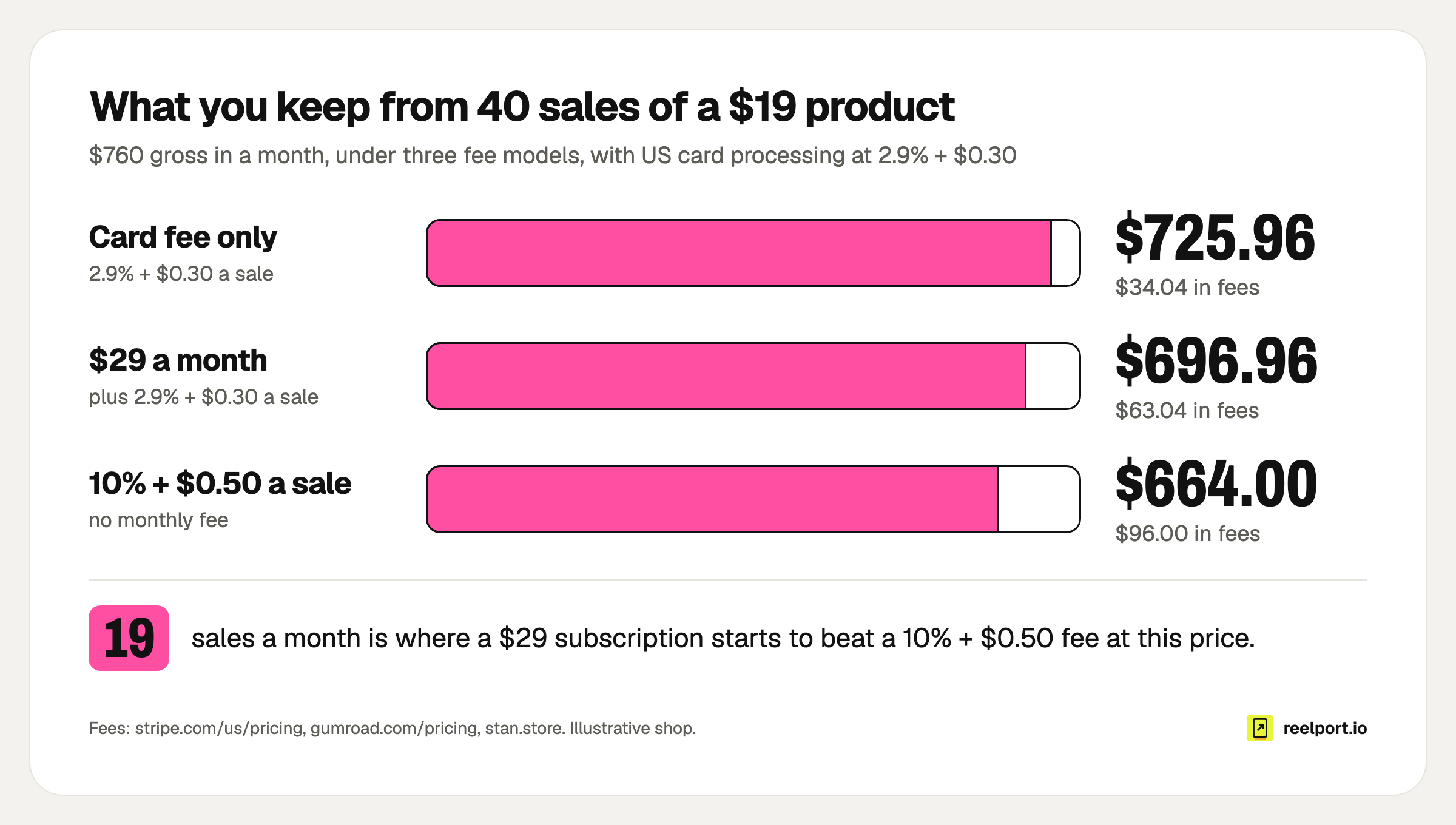
At 40 sales the fees come to $34.04, $63.04 and $96.00; the subscription overtakes the percentage fee at the 19th sale of the month.
The break-even you can reuse
A subscription beats a percentage fee once the monthly price is covered by the fees you no longer pay:
break-even sales per month = monthly fee ÷ (percentage fee per sale − card fee per sale)

Example: $29 ÷ ($2.40 − $0.851) = 18.7, so from the 19th sale
Put your own price in. At $9 the percentage fee is $1.40 and the card fee $0.561, so the break-even moves to 35 sales. Cheaper products make the fixed 50 cents and 30 cents weigh more, which is one reason a $9 product is harder to run than a $19 one.
Two things the table leaves out. An international card adds 1.5% on Stripe's US pricing, about $0.29 on this product. And the 10% model includes tax handling by the marketplace, which has a real value if you would otherwise pay an accountant to file in several countries.
Which route should you choose?
Choose the checkout on your bio page if you want to keep the most per sale and can handle your own tax. Choose a marketplace if you want someone else to be the seller. Choose a store subscription if you sell steadily and want its sales features.
| Your situation | Route that fits | Why |
|---|---|---|
| First product, unknown demand | Checkout on your bio page, on a free or low plan | No monthly cost to earn back, lowest fee per sale |
| Buyers in many countries, no accountant | Marketplace as merchant of record | It collects and remits the tax |
| Steady sales above the break-even | Subscription store or bio-page checkout | Fixed cost, no percentage |
| Already paying for a social media tool | Whatever checkout that tool includes | One subscription less |
| Several files, or files too big for a product card | A dedicated download page linked from the bio | More files and larger sizes per product |
How do you set it up, step by step?
Setup takes under an hour once the file exists: connect a payment account, add the product to your page, test the purchase yourself and put the link in your bios. The order matters, because a product you cannot be paid for should never go live.
- Finish the file. Export a PDF, or zip everything else into one archive. Name it the way a buyer would search their downloads folder:
overcast-preset-pack-v1.zip, notfinal2.zip. - Connect the payment account. With Stripe this means your details and a bank account. Do it first, since verification can take time.
- Add the product to your page. In reelport.io's Link in Bio, add a Product or offer block, turn on "Sell it here with Stripe", set a price (in US dollars by default, from $1.00) and attach the file (PDF, ZIP, presets, audio or video, up to 25 MB).
- Write the card. Use the template in the next section.
- Buy it yourself. Pay with a real card, check the email arrives, open the link on your phone, then refund yourself in the payment dashboard.
- Check delivery rules. Know how long the download link works and what a buyer does when it expires. On reelport.io the emailed link works for 7 days.
- Put the link in every bio. Instagram, TikTok, YouTube, and the pinned post or comment where each network has one.
- Move the product to the top. The first block gets the taps. See these link in bio ideas for the order of the rest.
For a product with several files, or one larger than a product card accepts, use a download page and feature it on the bio page. reelport.io's Download Pages hold up to 10 files per page at a fixed price or pay what you want, and show on your bio page as a card with cover, title and price.
What should the product card say?
A product card needs five lines: who it is for, what is in the file, what it changes, the price and what happens after payment. Buyers on a phone decide in seconds, and the usual reason they leave is not knowing what they will receive.
Copy and fill:
TITLE (max 6 words, name the result)
[Result] for [who]: e.g. "12 looks for overcast footage"

ONE LINE UNDER IT
For [who] who [problem]. Works with [app / camera / skill level].

WHAT YOU GET
- [Number] [files], [format], [size]
- [The thing people ask about first]
- [Licence in plain words: personal / client work allowed]

PRICE
$[price], one payment. Download link by email right after checkout.

SMALL PRINT
Link valid for [days]. Lost it? Reply to the receipt email.
[EU buyers: withdrawal wording, see below]

BUTTON
Get the [product name]
A screenshot of what is inside sells better than an adjective.
What changes when you sell to buyers in the EU?
Two rules apply once the buyer is a consumer in the EU: VAT follows the buyer's country, and the 14-day right of withdrawal only ends for a download if the buyer agreed to that before downloading. Both apply to a $9 PDF as much as to a $900 course.
VAT. The EU's business portal states that electronic services are always taxed in the customer's country. There is one relief: a business established in a single EU country whose cross-border sales to consumers stay under an annual threshold of EUR 10,000 (without VAT) can charge its own country's VAT instead. Above it, you charge each buyer's rate and declare everything in one quarterly return through the One Stop Shop, registered in your home country. A seller outside the EU has no such threshold: the buyer's country's VAT applies from the first sale.
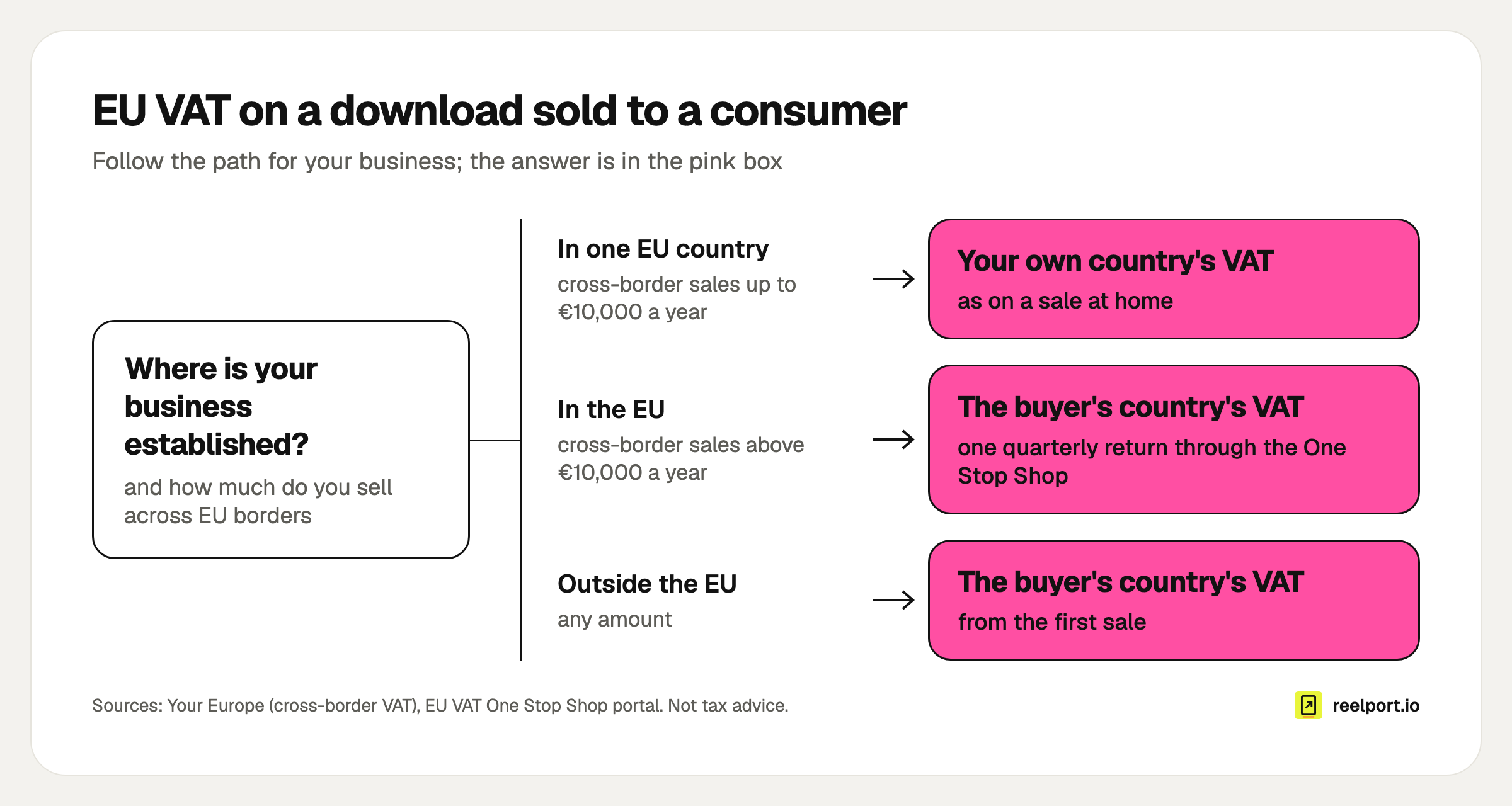
Three paths, two outcomes: only a small EU-based seller may use its home VAT rate on cross-border downloads.
This is the practical difference between the routes above. With a marketplace as merchant of record, the marketplace deals with it. With a checkout on your own payment account, you are the seller and the duty is yours. The page covers the general rule only, there are exceptions, and this is not tax advice: ask an adviser before your first cross-border month.
Withdrawal. Consumers in the EU can normally cancel an online purchase within 14 days. For online digital content that right ends once the buyer has started downloading, but only after they expressly agreed to lose it. Without that agreement, a buyer who downloaded your file can still ask for the money back.
Wording you can adapt for the product card and your terms (have it checked for your country):
This is a digital product delivered immediately. By completing the
purchase you ask for delivery to begin right away and agree that
your 14-day right of withdrawal ends once the download starts.
How do you get the first sales?
The first sales come from people who already asked for the product, so answer them where they asked. A link in bio converts taps you send to it; it does not create them. Use this launch checklist:
- One Reel or post that shows the result, with "link in bio" said out loud and written in the caption
- The product as the first block on the page for launch week
- A Story with a link sticker the same day
- A keyword reply for comments: people who comment get the link by DM (how comment-to-DM automation works)
- A free sample for an email address, for the people not ready to pay (lead magnet ideas)
- One email to that list on launch day and one before any deadline
- After 7 days: views, clicks and sales side by side, to see where people drop out
Read the last line as a funnel. Many views and few clicks point at the card. Many clicks and few sales point at the price or the checkout.
Where reelport.io fits
Link in Bio is part of every reelport.io plan, the Free plan included, with pages at reep.li/yourname. Custom domains are not supported.
For selling, as documented:
- A Product or offer block with "Sell it here with Stripe", paid straight into your own Stripe account. reelport.io never holds the money and adds no fee of its own; Stripe's fees apply.
- A Tips block where fans choose the amount.
- Buyers get the download link by email right after paying, valid for 7 days, and Stripe sends the receipt. Sales show under Stats; payouts and refunds are in your Stripe dashboard.
- Download Pages at reep.li/d/your-page for up to 10 files, with a per-file limit from 25 MB on Free to 500 MB on Agency. A full refund or a dispute closes the buyer's download.
- Paid bookings, courses and memberships on the same page, paid through Stripe.
A page sells in one currency: US dollars by default, or another one your Stripe account can charge in. Since the checkout runs on your Stripe account, you are the seller, so the tax questions above are yours to settle. The Link in Bio overview shows the blocks, the comparison with Linktree covers the differences, and plan limits are on the pricing page.