
The lead magnet ideas that work for creators are small, finished tools a follower can use within ten minutes: a preset pack, a template, a checklist, a swipe file, a calculator sheet. Pick the one that is the first step of what you sell, hand it out for a confirmed email address, and link it from your bio. The table below matches twelve ideas to niches and paid offers, and the rest of the post gives you the page copy, the emails and the arithmetic.
What makes a lead magnet idea worth building?
A lead magnet is worth building when it passes three tests: the follower gets a result in ten minutes, it is the first step of something you sell, and you can show it working in one short video. An idea that fails any of the three collects addresses from people who will never open your emails.
The ten-minute result. A 40-page ebook is homework. Three presets that change a photo in one click are a result. Jay Clouse of Creator Science makes the same point from the other side: checklists and ebooks have lost their pull, so make something good enough to sell and give it away.
The first step of your paid offer. Someone who downloads three presets is a plausible buyer of the full pack of thirty. Someone who downloads a generic "10 tips" PDF has told you nothing about what they would pay for.
One video can demo it. If you can film the freebie doing its job, every reel becomes its advert. If you need a paragraph to explain it, the idea is too abstract.
Which lead magnet ideas fit which creator?
Start from the paid offer you have or plan, then read the table right to left. Build times are rough estimates for a first version made from material you already have. They are there to compare ideas, not to promise a schedule.
| # | Lead magnet idea | Best for | File you hand out | Build time | Leads to |
|---|---|---|---|---|---|
| 1 | Three presets or LUTs from a popular post | Photo and video creators | XMP or CUBE in a ZIP | 1 to 2 hours | The full pack |
| 2 | The project file behind one reel | Editors, motion designers | DRP, PRPROJ, AEP or MOGRT | 1 hour | Template bundle, course |
| 3 | A one-page checklist | Travel, gear, fitness, any how-to niche | 1 hour | The full guide | |
| 4 | A swipe file of 30 hooks or captions | Social media and marketing creators | 2 hours | Coaching, a course | |
| 5 | A planner template | Productivity, finance, study creators | PDF with the template link | 2 to 3 hours | The full system |
| 6 | A calculator sheet (rates, macros, budget) | Freelancers, fitness, finance | Spreadsheet in a ZIP | 3 hours | Consulting, a programme |
| 7 | One week of a plan (meals, workouts, practice) | Food, fitness, music teachers | 2 to 3 hours | The 8 or 12 week plan | |
| 8 | A printable or pattern | Craft, design, education | PDF or PNG | 2 hours | The pattern shop |
| 9 | Chapter one or lesson one | Authors, course creators | PDF, EPUB or MP4 | Under 1 hour | The book, the course |
| 10 | A gear or tool list with reasons | Tech, film, home studio creators | 1 hour | A paid guide, affiliate links | |
| 11 | A sample pack or guided audio | Musicians, wellness creators | Audio files in a ZIP | 2 hours | The full pack, a membership |
| 12 | A script pack (brand pitch emails, DM replies) | Creators who teach creators | PDF or text file | 2 hours | Templates, a media kit service |
Three rules for choosing between two candidates:
- Pick the one people already ask for in comments. "What preset is that?" is market research you did not have to pay for.
- Pick the smaller one. Three presets beat thirty, because the thirty are what you sell.
- Pick the one with a file type your audience can open on a phone, unless your audience works at a desk.
One freebie per paid offer is enough. A second lead magnet earns its place only when you have a second product.
How does a lead magnet get from your bio to an inbox?
A lead magnet travels through six steps: a video shows it, a bio link or comment keyword points to it, a page asks for an email address, a confirmation email proves the address is real, the files unlock, and a next step offers what you sell. Each step loses some people, so each one deserves a deliberate choice.
- The reel shows the freebie in use. Before and after, or the template being filled in. End with one instruction, for example "link in bio" or "comment PRESET".
- Bio link or comment keyword. The bio link works on every network. A comment keyword that triggers a DM with the link works where DM automation is available, and it is covered step by step in the guide to Instagram comment-to-DM automation.
- The page. One headline, what is inside, an email field, a consent line, one button. Nothing else to tap.
- The confirmation email. The visitor clicks to confirm. This is double opt-in, and it is what turns a typed address into a subscriber you can prove.
- The files unlock. The download opens straight away and the same link arrives by email.
- The next step. A button to your paid offer, or a card for another download.
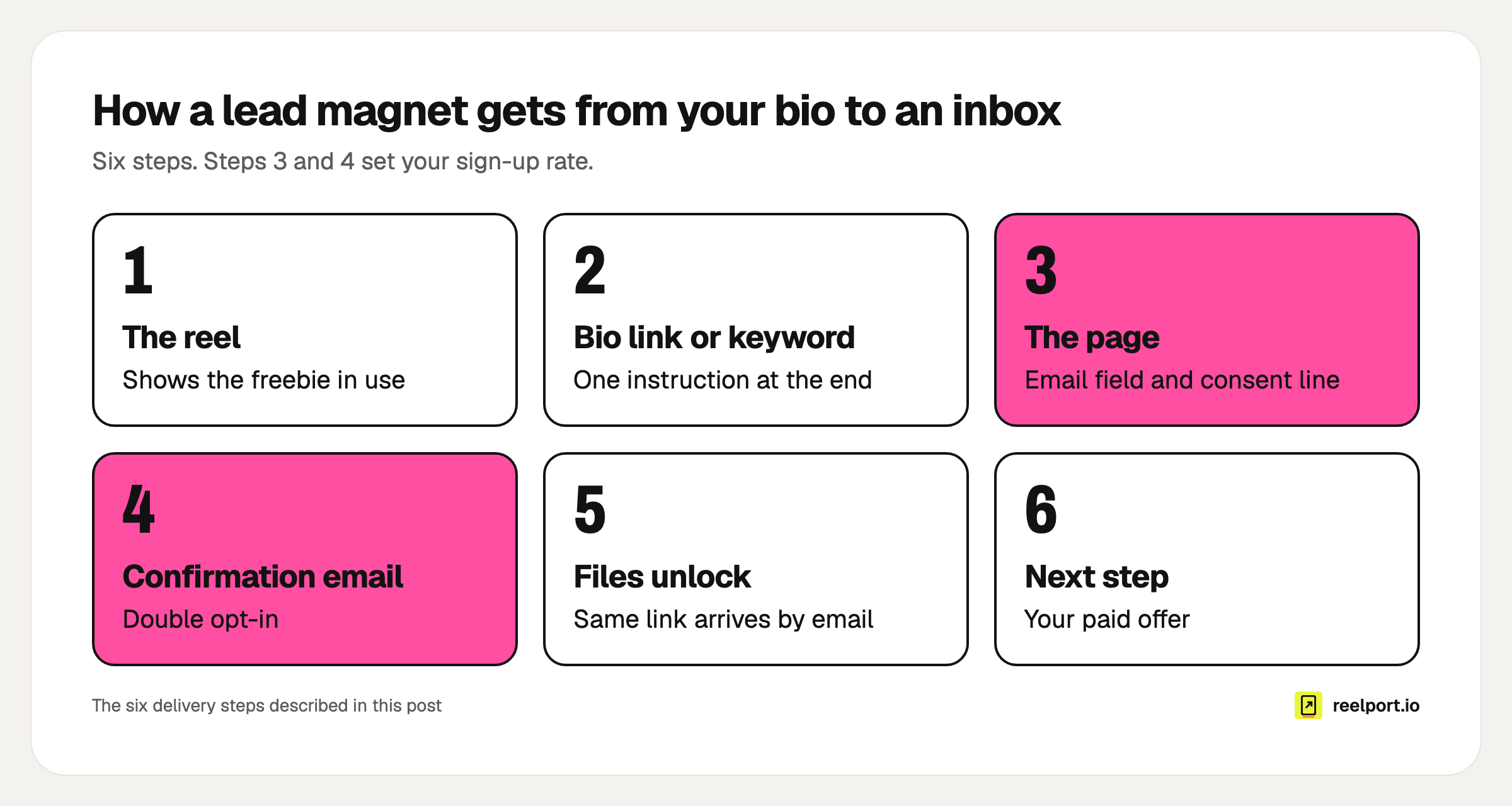
Six steps from the video to the offer. Steps 3 and 4 set your sign-up rate: the share who enter an address times the share who confirm it.
You can assemble this from a form tool, an email tool and a file host. In reelport.io it is one product: a Download Page at reep.li/d/your-page holds up to 10 files, sends the confirmation email, unlocks the files and shows the next step. In a Chat automation, the Download page step sends the link by DM after a comment or keyword.
How many subscribers will a lead magnet bring in?
Multiply three numbers: page views, the share who enter an email address, and the share who confirm. The example below uses an invented creator with invented rates to show the arithmetic. The rates are assumptions for the sum, so replace them with your own after two weeks.
Example (fictional): Mara, a travel filmmaker, gives away three LUTs from her Iceland reel.
| Step | Sum | Result |
|---|---|---|
| Page views in a month | 2,500 | |
| Enter an email address (assumed 20 %) | 2,500 × 0.20 | 500 |
| Confirm the address (assumed 80 %) | 500 × 0.80 | 400 |
| Buy the full pack at $29 (assumed 2 %) | 400 × 0.02 | 8 buyers, $232 |
Her page conversion rate is confirmed sign-ups divided by views: 400 ÷ 2,500 = 16 %.
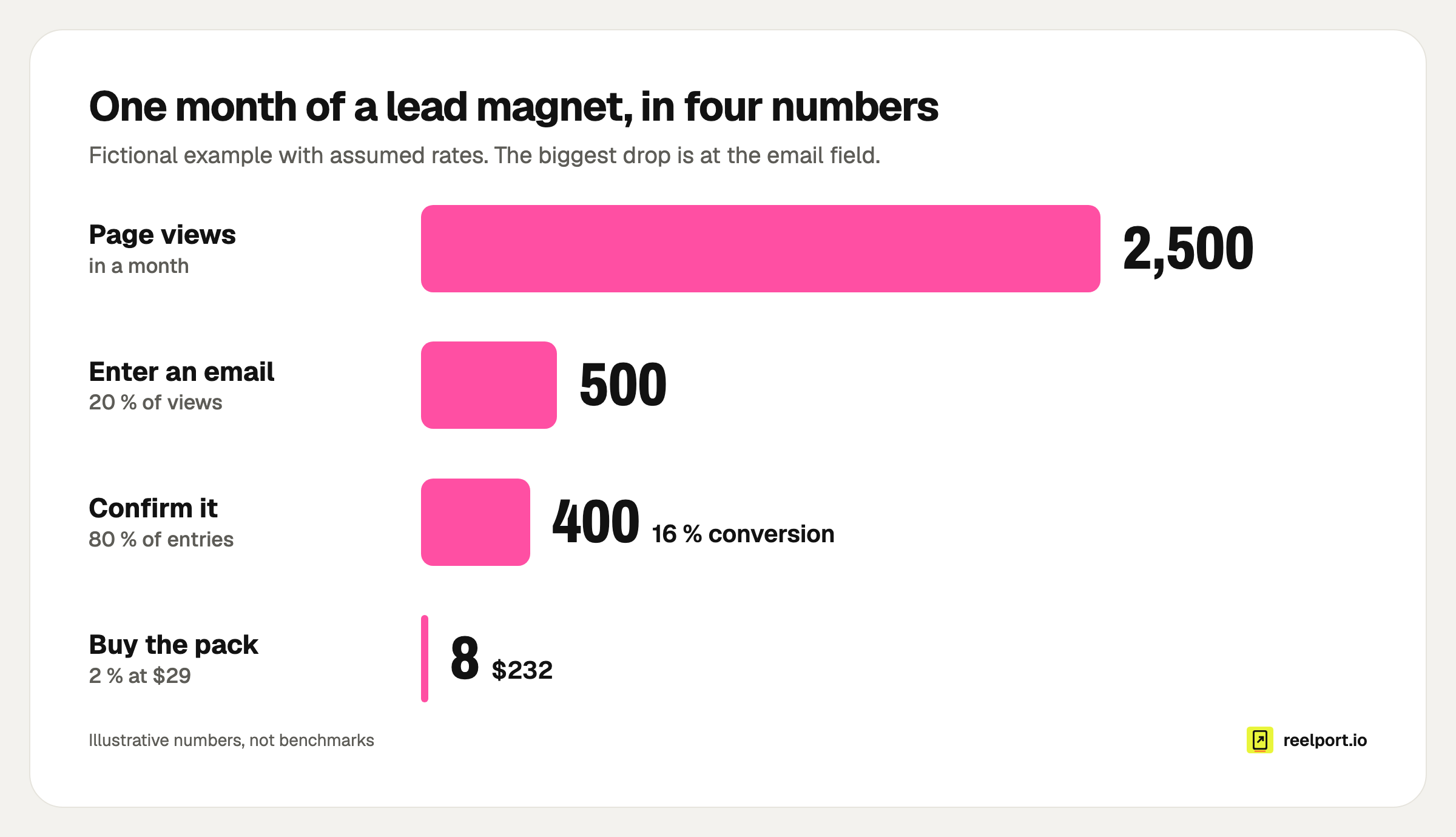
The biggest drop is between the page view and the email field, so the page is the first thing to improve.
The table also tells you where an hour of work pays most:
- Lifting the confirm rate from 80 % to 90 % adds 50 subscribers a month (500 × 0.90 = 450) without one extra view.
- Lifting the entry rate from 20 % to 25 % adds 100 (2,500 × 0.25 × 0.80 = 500).
- Doubling views doubles everything, and costs the most effort.
Track the same three numbers for your own page. Download Pages show views, sign-ups, the conversion rate and downloads per page, counted without cookies.
What should the page and the emails say?
Write the page as an answer to one question: what do I get, and how fast. Then write two emails: the one that delivers the files, and one follow-up two days later that asks what they made. Copy the block below and replace the brackets.
PAGE

Tag:        Free download
Headline:   [The result], in [time]. Example: My Iceland look
            on your footage, in one click.
What's inside (3 to 5 lines):
            - [File 1 and what it does]
            - [File 2 and what it does]
            - [How to install it, in one line]
Button:     Send me the [thing]
Consent:    Enter your email to get the [thing]. I'll also send
            you [what, how often]. Unsubscribe with one click.

EMAIL 1, sent when the address is confirmed
Subject:    Your [thing] is ready
Body:       Here is your download: [link]
            Start with [file], it takes [minutes].
            Reply and tell me what you used it on.

EMAIL 2, two days later
Subject:    Did the [thing] work for you?
Body:       One tip most people miss: [tip].
            If you want the full version, [paid offer] has
            [what more], here: [link]
Keep the "what, how often" part of the consent line honest. If you plan a weekly newsletter, say weekly.
What consent do you need to email people in the EU?
You need consent you can prove, given for something the person understood. Article 7(1) GDPR puts the proof on you: the controller must be able to demonstrate that the person consented. Article 7(3) adds that withdrawing must be as easy as giving it. Double opt-in and a one-click unsubscribe link cover both.
The wording matters as much as the mechanism. Recital 43 says consent is presumed not freely given when a service is made conditional on consent that the service does not need. A freebie that quietly signs people up for marketing sits close to that line, and regulators do not all read it the same way. The safe minimum is to say on the form exactly what the address will be used for, and to send only that. This is general information, not legal advice.
A proof-of-consent record has four parts:
- the email address
- the exact consent text the person saw
- the time they submitted and the time they confirmed
- a working unsubscribe link in every email
reelport.io's Download Pages store the consent text and time with each sign-up and include both in the CSV export. An address that is never confirmed is not shown to you and is deleted after 7 days. For the rest of your tool stack, run the GDPR check for social media tools.
Why is your lead magnet not converting?
Find the step where the numbers fall, then fix that step only. Most problems sit in one of six places, and each has a symptom you can see in your stats.
| Symptom | Likely cause | Fix |
|---|---|---|
| Reel gets views, page gets none | The call to action is buried or vague | Say one instruction out loud and put it on screen in the last three seconds |
| Page views, few email entries | The headline describes a file, not a result | Rewrite it as result plus time; show a preview image of what is inside |
| Entries, few confirmations | The confirmation email lands late or in spam | Tell people on the page to check their inbox now; keep the subject plain |
| Confirmations, few downloads | The file is awkward on a phone | Offer a PDF or a phone-friendly format next to the desktop file |
| Subscribers, no replies or clicks | The freebie attracted the wrong people | Narrow the freebie until it only suits your buyers |
| Subscribers, no sales | The paid offer is a different topic | Make the freebie a slice of the product, as in the table above |
Change one thing, wait for a few hundred views, and compare the conversion rate before and after.
Where reelport.io fits
reelport.io covers the path from the post to the inbox. You schedule the reel, a Link in Bio page at reep.li/yourname shows the download as a card, Chat sends the link to people who comment a keyword, and the Download Page collects the confirmed address and hands out the files. Sign-ups can sync to Kit, Mailchimp or beehiiv.
Download Pages are in every plan: one page with files up to 25 MB each on Free, five pages and 100 MB per file on Creator at $19 a month. Chat is part of every paid plan. The limits for Pro and Agency are on the pricing page. If you want more to put on the bio page around the freebie, the list of link in bio ideas is the next read.