
To schedule TikTok videos without extra software, open the upload page on tiktok.com in a desktop browser, add the video, switch on scheduling and pick a time between 15 minutes and 10 days away. For anything further out, or for a video that should also go to other networks, use a scheduling tool that posts through TikTok's Content Posting API. The rules for both routes are listed below with their sources.
How do you schedule TikTok videos in TikTok itself?
TikTok's own Video Scheduler sits on the web upload page. TikTok's announcement says it is available to creators and Business Accounts, that desktop scheduling needs a Business Account, and that you can pick a time from 15 minutes to 10 days ahead.
- Open tiktok.com in a desktop browser and sign in.
- Go to the upload page and add your video.
- Write the caption, choose the cover and set who can watch.
- Switch on the schedule option and pick the date and time.
- Confirm. The post now shows as scheduled on the web and in the app.
Two things to know before you rely on it. First, the same announcement states that you can't edit the video, the caption or the scheduled time afterwards: to change anything you delete the scheduled post and upload it again. Second, if you don't see the option, check the account type. TikTok points you to Settings, then Account, to switch to a Business Account.
Guides disagree on phones. Buffer reports that the separate TikTok Studio app can schedule and gives a 30-day window, while TikTok's announcement says 10 days. The date picker in your own account settles it: dates you can't select are outside your window.
Which way of scheduling should you pick?
Pick the native scheduler when the video is for TikTok only, goes out within 10 days and will not change. Pick a scheduling tool when you batch further ahead, post the same video to other networks or want to fix a caption after scheduling. Pick a reminder when the post needs something only the TikTok app can add.
| Native scheduler | Scheduling tool | Reminder | |
|---|---|---|---|
| Where you do it | Upload page on tiktok.com | The tool's composer | The tool reminds you, you post in the app |
| How far ahead | 15 minutes to 10 days | Set by the tool | Any date |
| Change it after scheduling | No, delete and re-upload | Depends on the tool | Yes |
| Other networks in the same step | No | Yes | Yes |
| Posts by itself | Yes | Yes | No |
| Sounds from TikTok's library | Whatever the upload page offers you | No | Yes |
| Account needed | A Business Account for desktop scheduling, per TikTok's announcement | Any account that authorises the tool | Any |
The middle column deserves a note. TikTok's posting API has no scheduling field: the Direct Post reference lists none. A tool keeps your file and sends it to TikTok at the minute you chose, so the window, the editing rules and the reliability are the tool's own.
How far ahead can you schedule a TikTok?
Natively, 10 days, going by TikTok's announcement. That is enough for a week's content and too short for a monthly batch. A scheduling tool removes the cap because it holds the video itself and posts it on the day.
Here is what the cap costs in practice. Take an invented example account, a coffee cart called Kaffeerad that posts every second day: 15 videos in a 30-day month.
- With the native scheduler, one session reaches 10 days ahead and covers the posts on days 2, 4, 6, 8 and 10. That is 5 videos per session, so the month needs 15 ÷ 5 = 3 sessions, on day 0, day 10 and day 20.
- With a tool, all 15 videos are scheduled in 1 session.
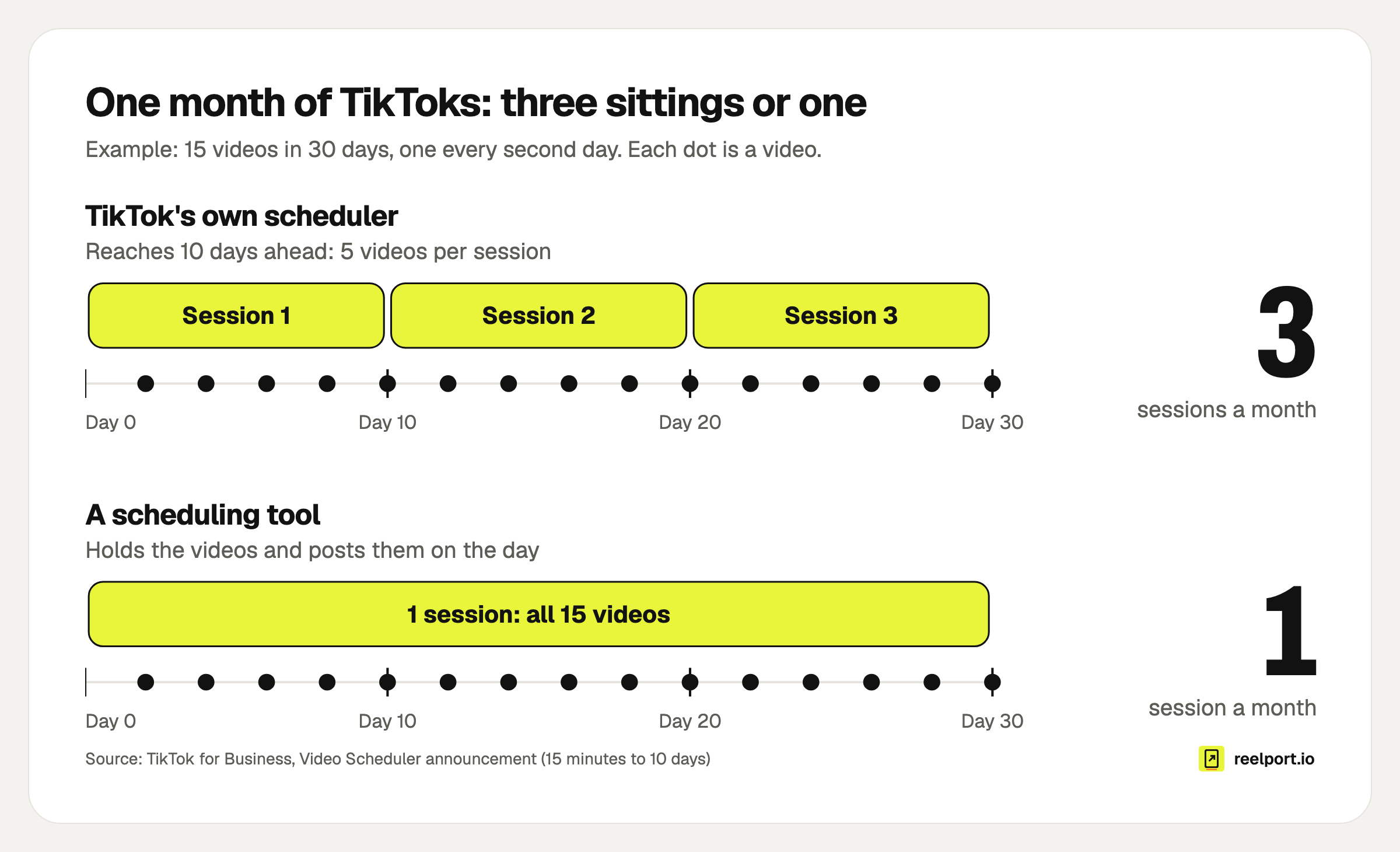
The native 10-day window turns one monthly batch into three sittings.
Three sessions are fine until the person who edits is not the person with the TikTok login, or the third session lands in the week you are away. If your content calendar is planned a month ahead, the scheduling should reach as far as the plan does.
How do you schedule TikTok videos with a third-party tool?
You connect your TikTok account once, upload the video, fill in the settings TikTok requires and pick a time. The tool publishes through TikTok's Content Posting API at that time. TikTok's rules for these tools are public, and they explain most of what you see on the screen.
- Connect TikTok. You sign in on TikTok and allow the tool to post. No password is shared with the tool.
- Upload the finished video. Export it vertical, with the audio already in the file.
- Write the caption. The API takes up to 2,200 characters.
- Choose who can watch. TikTok's content sharing guidelines require that you pick this yourself and that the tool offers no default.
- Switch on comments, Duet and Stitch if you want them. The same guidelines require these to be off until you turn them on.
- Answer the disclosure question if the video promotes something: your own brand, or branded content for someone else.
- Pick a cover frame. Without one, TikTok uses the first frame.
- Pick the date and time, then schedule.
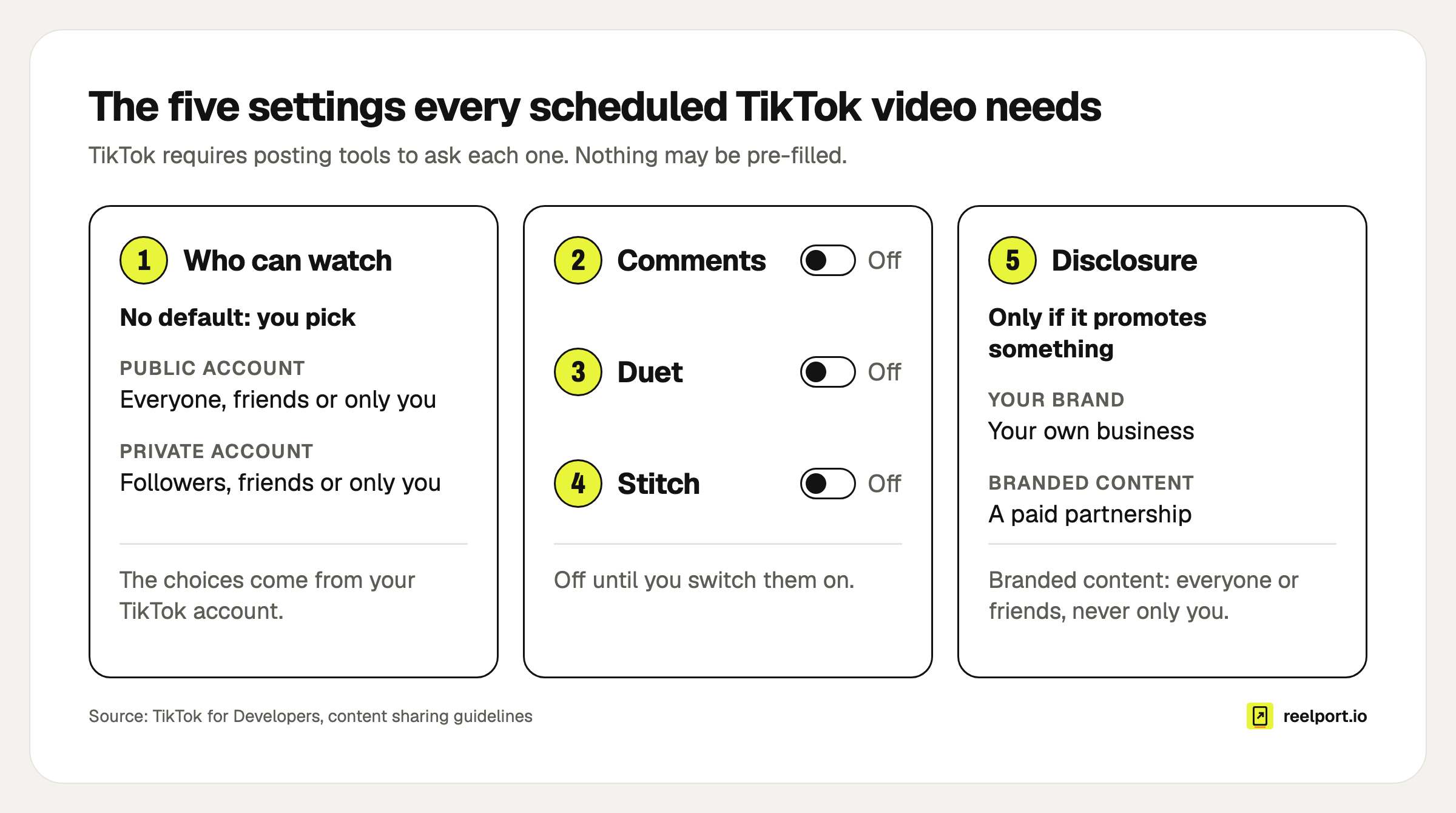
TikTok makes every posting tool ask these five things for a video, and none of them may be pre-filled. Photo posts have no Duet or Stitch.
The options you see come from your account. TikTok's creator info endpoint tells the tool which audiences you may choose: a public account gets everyone, friends and only you; a private account gets followers, friends and only you. Duet and Stitch are unavailable on private accounts or when you have set them to "No one" in your privacy settings. Branded content can only go out to everyone or to friends, never as "only you".
In reelport.io these fields sit under the caption in the composer. They are read live from your TikTok account and checked again just before the post goes out, and you can edit the post any time until it starts publishing.
One rule that surprises people: unreviewed apps post privately
TikTok audits every app that posts on your behalf. Until an app has passed, the guidelines restrict it: posts go out as "only you", the account has to be set to private at the time of posting, and at most 5 users can post through the app in 24 hours.
Ask any tool where it stands before you plan a campaign around it. For reelport.io the honest answer today is that TikTok's review is still running, so TikTok posts from reelport.io are private until it is done. Until then, only you can change a posted video's audience, in the TikTok app.
What file does TikTok accept for a scheduled video?
For tools that post through the API, TikTok accepts MP4, WebM or MOV up to 4 GB, between 23 and 60 frames per second, and no longer than 10 minutes or your account's own maximum, whichever is shorter. The upload page on tiktok.com shows its own limits when you add a file.
| Setting | Limit for posts sent by a tool | Source |
|---|---|---|
| Container | MP4 (recommended), WebM, MOV | Media transfer guide |
| Codec | H.264 (recommended), H.265, VP8, VP9 | Media transfer guide |
| Frame rate | 23 to 60 fps | Media transfer guide |
| Picture size | 360 to 4,096 pixels on each side | Media transfer guide |
| File size | Up to 4 GB | Media transfer guide |
| Length | Up to 10 minutes, and never above your account's maximum | Media transfer guide, creator info |
| Caption | Up to 2,200 characters | Direct Post reference |
| Photo post | Up to 35 photos, title up to 90 characters, description up to 4,000 | Photo post reference |
Your tool may be stricter than TikTok, with a smaller upload size for example. A good one checks the file, the caption length and your account's longest allowed video before you schedule, so you find out at your desk and not at the posting time.
On framing, TikTok's business blog advises shooting in 9:16 and keeping text away from the top, the bottom third and the icons on the right. Check a frame against the safe zones tool before you export.
Can you use trending sounds on a scheduled TikTok?
Not through a tool. The video parameters in TikTok's Direct Post reference contain no field for a sound, so a video scheduled through any tool is published with the audio that is in the file. Photo posts are the exception: the API can let TikTok add recommended music to them.
That leaves three workable options:
- Put the audio into the video in your editor, using music you have the rights to. Before a tool posts, TikTok has you agree to its Music Usage Confirmation.
- Post that one video by hand in the app, where the sound library is. A reminder mode helps here: reelport.io's Remind me mode notifies you at the planned time and you post it yourself.
- Use the native upload page and whatever sound options it offers your account.
Why did a scheduled TikTok fail or go out private?
Almost every failed or misbehaving scheduled TikTok traces back to one of TikTok's published rules: the 10-day window, the audit status of the tool, the daily posting cap per account or a setting your account doesn't allow. Find the symptom, then apply the fix.
| Symptom | Cause | Fix |
|---|---|---|
| No schedule option on tiktok.com | Wrong account type, or you are in the phone app | Use a desktop browser; switch to a Business Account under Settings, Account |
| The date you want can't be selected | Native window ends 10 days ahead | Schedule it in a later session, or use a tool |
| Typo in a natively scheduled post | Scheduled posts can't be edited | Delete it and upload again |
| The tool's post is visible only to you | The tool's app has not passed TikTok's audit | Change the audience in the TikTok app, or wait for the tool's approval |
| The tool says the account must be private | Same cause: unaudited apps may only post to private accounts | Set the account to private under Settings and privacy, Privacy, then retry |
| The tool reports a daily posting limit | TikTok caps posts through the API per account in 24 hours, typically at around 15, shared across all tools | Retry the next day; spread the batch |
| Video rejected as too long | Longer than 10 minutes or than your account's maximum | Cut it, or upload it in the app |
| The audience you want is missing | Options depend on whether the account is public or private | Change the account's privacy first |
| Duet or Stitch can't be switched on | Private account, or set to "No one" in your privacy settings | Change the setting in the TikTok app |
| Branded content won't save as "only you" | Branded content must be public or friends | Pick one of those audiences |
| Wrong cover image | No cover frame chosen, so the first frame is used | Pick the cover frame before scheduling |
| Posted without the planned sound | Tools can't attach TikTok sounds | Bake the audio in, or post by hand |
The cap, which TikTok says is typically around 15 posts and varies between creators, and the audit rules come from TikTok's content sharing guidelines. A temporary outage is a different case: a good tool retries by itself. reelport.io retries network errors, outages and rate limits after 1, 5 and 15 minutes, then shows the reason on the queue and emails whoever created the post.
What should you check before you schedule a batch?
Run through this list once per batch. It takes five minutes and covers every row of the table above.
TikTok batch check

[ ] Every video is vertical (9:16), with text clear of the top, bottom third and right edge
[ ] Audio is in the file, and I have the rights to it
[ ] Length is under my account's maximum
[ ] File is MP4 or MOV, 23 to 60 fps
[ ] Caption is under 2,200 characters, hashtags included
[ ] Who can watch is chosen for each video
[ ] Comments, Duet and Stitch are switched on where I want them
[ ] Disclosure is set on anything that promotes a brand
[ ] Cover frame is picked
[ ] No more than 15 posts land in any 24 hours
[ ] Times are checked against when my viewers are active
[ ] Trend videos that need a TikTok sound are left out and posted by hand
[ ] Someone is free to reply to comments after each post goes out
On timing, TikTok's business blog says the best time to post is "unique for everyone" and points you to your own audience data. Start from the activity hours in your own analytics and adjust after two weeks of results.
Where reelport.io fits
reelport.io schedules TikTok videos and photo carousels of up to 35 photos alongside your other networks, so one upload can also go out as an Instagram Reel and a YouTube Short, each with its own caption. Publishing runs on servers in the EU at the scheduled minute, with your computer off. The queue and calendar show what goes out next, and Insights reports the views, likes, comments, shares and followers TikTok provides.
Two limits to know: TikTok's review of reelport.io is not finished, so TikTok posts are private for now, and TikTok comments are not in the inbox because the TikTok developer API that reelport.io connects through has no scope for comments. Plans start at $0, Creator is $19 a month, and the 14-day Pro trial needs no card. See pricing.