
A social media content calendar is a dated list of every post you intend to publish, with its network, format, owner and status. To build one that survives past week two, start from the minutes you have each week, turn them into a fixed number of slots, and plan each post backwards from its publish date. This guide gives you the arithmetic, the columns and a template to copy.
What is a social media content calendar?
A social media content calendar is the single place where each planned post has a date, a time, a network, a format, a person responsible and a status. It answers three questions at a glance: what goes out next, who is working on it, and whether it will be ready in time.
It is narrower than a strategy. The strategy says who you want to reach and why. The calendar turns that into Tuesday's carousel. If a line in your calendar has no date or no owner, it is still an idea, and it belongs on an ideas list.
Most guides stop at the grid. The grid is the easy part. Calendars fail because they hold more posts than the week has hours for, and because dates are set for publishing but not for the work before it. The next sections fix both.
What should a social media content calendar include?
A working calendar needs one row per post per network and about a dozen columns: when and where it goes out, what it is, who makes it, where the file lives, three due dates before publishing and one result after it. Anything you never filter or sort by can go.
| Column | What goes in | Why it earns its place |
|---|---|---|
| Publish date and time | The slot, in your audience's time zone | Sorting and spotting gaps |
| Network | One network per row | Captions and formats differ per network |
| Format | Reel, carousel, photo, story, text | Drives production time |
| Pillar | One of your 3 to 5 themes | Shows a lopsided week |
| Working title and hook | The first line or first second | The part that decides if it is watched |
| Caption and call to action | Final text, link if any | Ready to paste or import |
| Asset link | Folder or file URL | Nobody asks where the video is |
| Owner | One name | Two owners means none |
| Status | Idea, briefed, in production, in review, approved, scheduled, published, logged | The column you read every morning |
| Brief due, asset due, review due | Three dates before publishing | Makes lateness visible early |
| Result after 7 days | The one number you chose | Feeds next month's plan |
Copy this header row into a spreadsheet to start:
publish_date,publish_time,network,format,pillar,working_title,hook,caption,cta,link,asset_link,owner,status,brief_due,asset_due,review_due,result_7d,notes
One example row, so the format is clear:
2026-09-16,12:00,Instagram,Reel,Show the work,Glazing a mug in 30 seconds,"Three dips, one mug",,Shop link in bio,,drive/reels/glazing,Mara,briefed,2026-09-06,2026-09-09,2026-09-14,,Source for the TikTok and Shorts rows
How many posts a week can your content calendar hold?
Your calendar can hold as many posts as your weekly minutes pay for, after you subtract the work that happens whether you post or not. The formula: weekly minutes, minus fixed tasks, minus a reserve for the unplanned, divided by the minutes each format takes you.
Here is a worked example with an invented account: Nordlicht Keramik, a two-person pottery studio with 6 hours a week for social media. The minutes per format are theirs. Time your own for two weeks before you trust any number.
- Total: 6 hours = 360 minutes.
- Fixed tasks: planning 30 minutes, replying to comments and messages 75 minutes (15 minutes on 5 days), logging results 15 minutes. That is 120 minutes.
- Reserve: 30 minutes for one unplanned post.
- Left for production: 360 − 120 − 30 = 210 minutes.
- Spend the 210: one Reel at 90 minutes, one carousel at 60, one photo post at 25, one set of stories at 15, and adapting the Reel for TikTok and YouTube Shorts at 10 minutes each, 20 in total. 90 + 60 + 25 + 15 + 20 = 210.
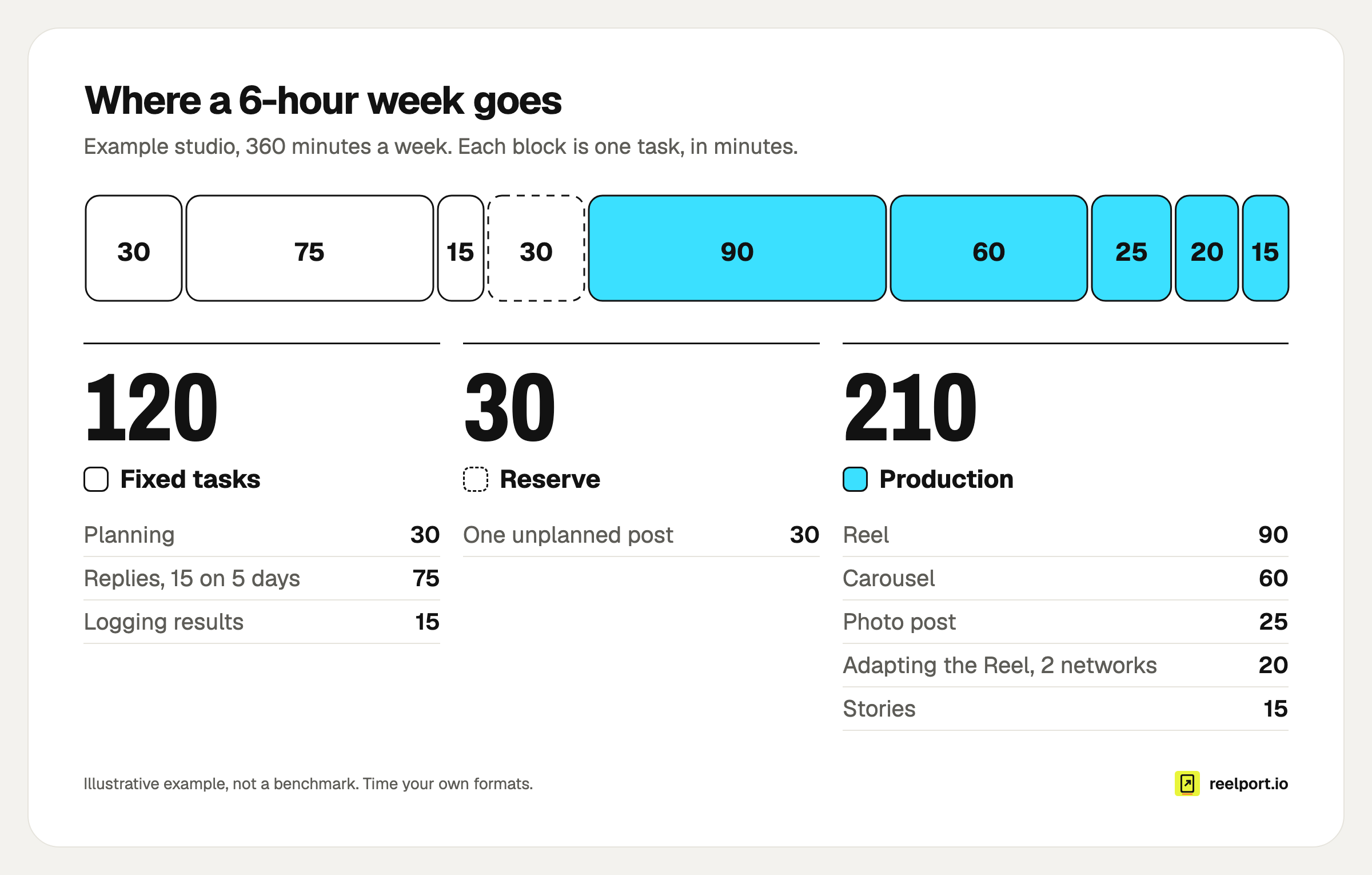
A third of the example week is gone before a single post is made.
The result is 4 pieces made and 6 posts published, because the Reel goes to three networks. That is the calendar's size: four slots and one open one. A fifth planned post would need 15 to 90 minutes the studio does not have, so it would push something else late.
Two things follow from the arithmetic. A new network costs minutes even when you reuse the video, so add it to the sum before you add it to the calendar. And if you want more posts, the cheapest lever is the format mix: swapping the carousel for two photo posts frees 10 minutes and adds a slot.
If you plan in reelport.io, the Contentplanner asks for your hours a week and the formats you can make in the brand profile, and a live check tells you whether your posts per week fit those hours.
How do you decide what goes into each slot?
Give every slot a fixed day, time, format and pillar, then fill the slots instead of a blank month. A pillar is a recurring theme your audience expects from you. With three to five pillars and a slot for each, a week is balanced by design and nobody has to decide on Monday morning what kind of post is due.
The example studio's week:
| Day and time | Pillar | Format | Networks |
|---|---|---|---|
| Monday 18:00 | Teach | Carousel | |
| Wednesday 12:00 | Show the work | Reel | Instagram, TikTok, YouTube Shorts |
| Friday 17:00 | Sell | Photo post | |
| Saturday 10:00 | Behind the scenes | Stories | |
| Open | Whatever comes up | Any | Any |
The times are placeholders. Take yours from your own numbers: the guide to the best time to post on Instagram shows how to read them, and Insights in reelport.io lists your best posting times.
On the mix between helpful and promotional posts, SocialPilot describes the common 80-20 rule: 80% informative or entertaining, 20% promotional. Slots make such a ratio concrete. One "Sell" slot out of four planned ones is 25%, close enough, and you can see it without counting.
A scheduler can hold the slots for you. In reelport.io each channel has its own posting schedule of time slots, and a new post can take the next free one.
How far ahead should you plan a social media content calendar?
Keep two weeks firm and two more weeks sketched. Firm means briefed, with due dates. Sketched means a pillar and a working title in the slot. Sprout Social suggests planning the core calendar two to four weeks ahead, and Hootsuite reports that most teams plan one to four weeks ahead.
The reason for two firm weeks is the lead time of a single post. Plan each one backwards from its publish day, called D here:
| When | What is done | Status after |
|---|---|---|
| D−10 | Brief written: hook, format, list of shots or slides | Briefed |
| D−7 | Shot or designed | In production |
| D−4 | Edited, caption and alt text written | In review |
| D−2 | Reviewed and approved | Approved |
| D−1 | Scheduled, with the file and caption checked | Scheduled |
| D | Published, replies answered | Published |
| D+7 | Result written into the calendar | Logged |
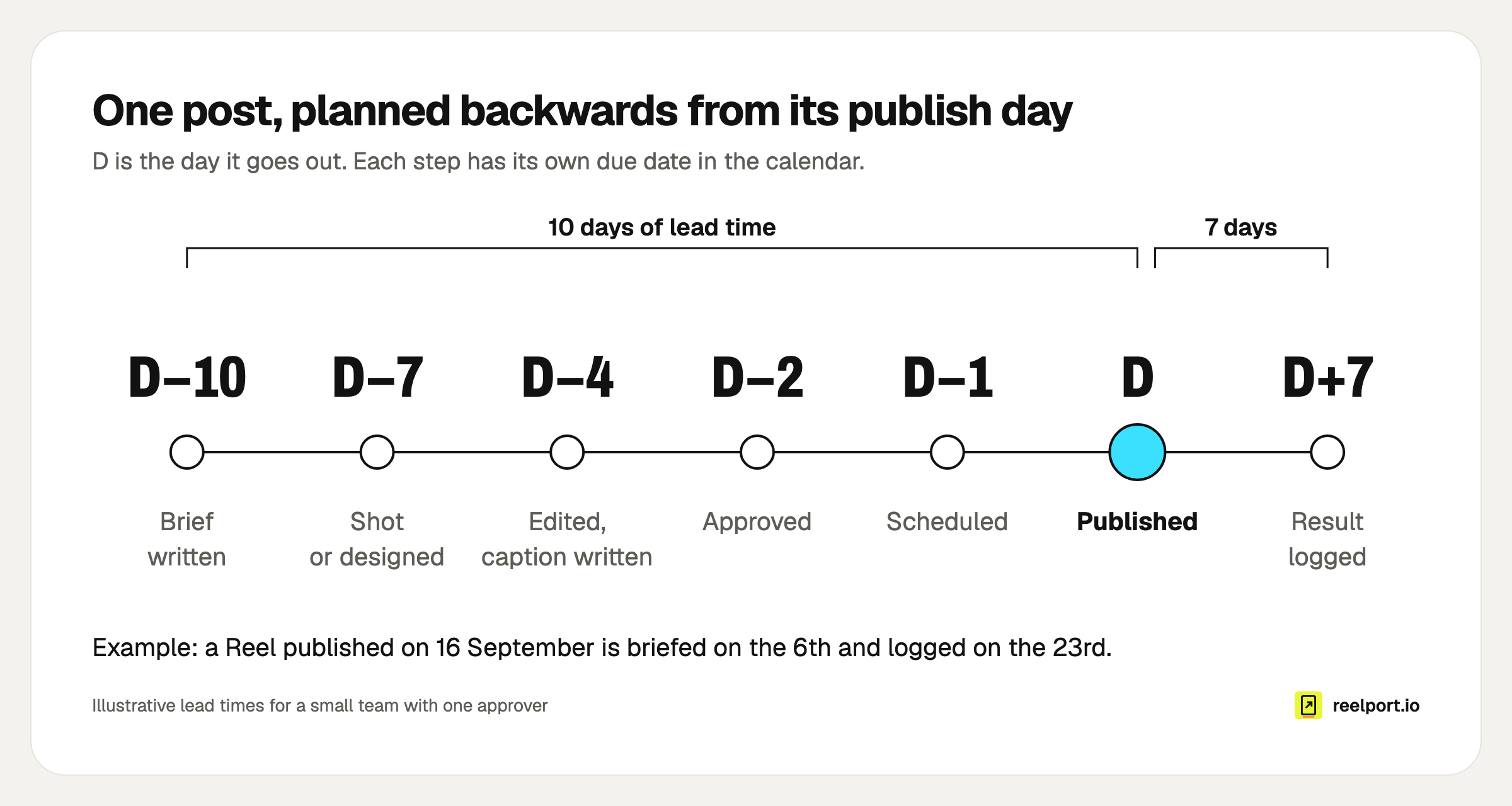
With 10 days of lead time, a Reel published on 16 September is briefed on the 6th and logged 7 days later, on the 23rd.
A calendar that only reaches one week ahead is therefore always late. These offsets fit a small team with one approver. A solo creator can halve them. An agency with a client sign-off should add days to the review step, not squeeze the edit. Whatever numbers you pick, write them into the three due-date columns so that a late brief shows up ten days before the gap in your feed does.
How do you build a social media content calendar step by step?
Build it in one sitting of about an hour: count your minutes, fix your slots, enter the dates you already know, then fill two weeks. Do the steps in this order, because each one limits the next.
- Count the minutes you have each week and subtract fixed tasks and a reserve, as in the example above.
- List the formats you can make and how long each takes you.
- Choose three to five pillars and the networks you will serve.
- Turn the remaining minutes into slots with a day, time, format and pillar. Leave one open.
- Enter fixed dates for the next quarter first: launches, sales, events, holidays your audience cares about.
- Fill the next two weeks completely, with owner and due dates. Sketch the two weeks after.
- Schedule what is approved, and book a 15-minute review at the same time every week.
Step 7 is where planning and publishing meet. If the calendar lives in a spreadsheet and the posts in a scheduler, update the status in one of them only, or the two will disagree by Thursday. The guide to scheduling Instagram Reels covers the hand-over for video.
Why do content calendars break, and how do you fix them?
Calendars break for a handful of repeatable reasons, and each one has a visible symptom. Most trace back to a missing number: minutes, a due date or a result. Find your symptom in the table and change that one thing before you redesign anything.
| Symptom | Cause | Fix |
|---|---|---|
| Posts go out late every week | More slots than minutes | Redo the capacity sum and remove a slot |
| The week is all one kind of post | Slots have no pillar | Assign a pillar to each slot |
| Posts wait in review for days | No review date, or several approvers | One approver per post, due at D−2 |
| A trend arrives and nothing can move | No open slot | Keep one slot and its minutes unplanned |
| Calendar and feed disagree | Status kept in two places | One source for status, checked weekly |
| Next month looks like last month | Results never written down | Fill the 7-day result, review on Fridays |
| Holiday posts are made the night before | Fixed dates entered too late | Enter the quarter's dates first |
| One network gets leftovers | One row for all networks | One row per network, own caption |
For the review bottleneck in a team, an approval step in the publishing tool does what the due-date column does on paper: a post waits for approval and cannot go out before someone with publishing rights says yes.
What should a weekly content calendar review cover?
A weekly review takes 15 minutes and covers three things: what happened last week, whether the next two weeks are on track, and what moves into the open slot. Run it at the same time every week with the calendar open, and change the calendar during the meeting.
Weekly calendar review (15 minutes)

Last week
[ ] Every published post has its 7-day result filled in (for posts from two weeks ago)
[ ] Best and worst post named, with one guess why
[ ] Anything that slipped: which due date was missed first?

Next two weeks
[ ] Every slot has a post with an owner
[ ] No brief, asset or review date is overdue
[ ] Approved posts are scheduled
[ ] Fixed dates in the next 14 days are covered

Further out
[ ] Two more weeks are sketched: pillar and working title per slot
[ ] The open slot for next week is assigned or deliberately left open
[ ] One change to try, written into the notes column
The "one change" line matters most. When the calendar records what you changed and what the number did afterwards, a quarter of Fridays gives you a playbook built on your own audience.
Where reelport.io fits
reelport.io keeps the plan and the publishing in one place. The Contentplanner writes a dated plan from your own Insights, your posts per week and your hours, including the holidays for the country you pick (Germany, Austria, Switzerland, the US or the UK) and the launches you entered, and each post can be sent on to the composer. The queue and calendar show what is scheduled per channel, approvals hold posts for review, and a bulk CSV upload (in beta) takes a batch of posts at once.
Content plans are included from the Creator plan at $19 a month, and the Planner add-on at $9 a month moves any plan up one Contentplanner tier. The Free plan lets you set up a brand profile, and the 14-day Pro trial needs no card. See pricing.