
A social media approval workflow is the fixed path a post takes from draft to published: who reviews it, in what order, by when, and what happens when nobody answers. The version that holds up in practice sorts posts into three risk tiers, names one approver per step and counts every deadline backwards from the publish time. A routine post then needs one working day of lead time, a client post five and a sensitive one seven.
What is a social media approval workflow?
A social media approval workflow is a written rule set that decides who may publish what. It states who drafts, who signs off, how long each reviewer has, what happens to a post that is edited after sign-off and what silence means. If any of those five answers lives only in someone's head, you have a habit, and habits fail on the day that person is on holiday.
The five decisions, in the order you should make them:
- Who drafts. Usually whoever runs the channel.
- Who approves. One named person per step, plus one deputy.
- By when. A review window per step, in working days.
- What an edit does. Whether a change after approval sends the post back.
- What silence means. Whether a post with no answer goes out, waits or moves.
Everything else (tools, labels, colour codes) is decoration on top of these.
Which posts need approval, and from whom?
Not every post deserves the same scrutiny. Sort posts by what a mistake would cost: routine posts get one reviewer, posts that speak for a client get two, and posts with legal, financial or reputational weight get three. Sending everything through the heaviest path is the most common reason approvers stop reading carefully.
Use these questions in order. The first "yes" sets the tier.
| Ask about the post | If yes | Reviewers, in order |
|---|---|---|
| Does it make a claim about health, money, law or safety? Is it a paid partnership, a contest or a giveaway? Does it respond to a complaint, an incident or a news event? Does it name or show someone who has not agreed to appear? | Tier 3: sensitive | Team lead, then legal or compliance, then the client or brand owner |
| Is it new creative, a new campaign or a new format? Does it state a price, an offer, a date or a product detail? | Tier 2: standard | Team lead, then the client or brand owner |
| None of the above: a recurring format that was approved once, an evergreen repost, a caption from an approved library | Tier 1: routine | Team lead, or a second team member |
Two rules keep the tiers honest. When in doubt, the drafter picks the higher tier. And only the approver can move a post down a tier, never the person who wrote it.
In Tier 3, legal reviews before the client. That way the client only ever sees copy they are allowed to approve, and you avoid two reviewers sending contradicting changes at the same time.
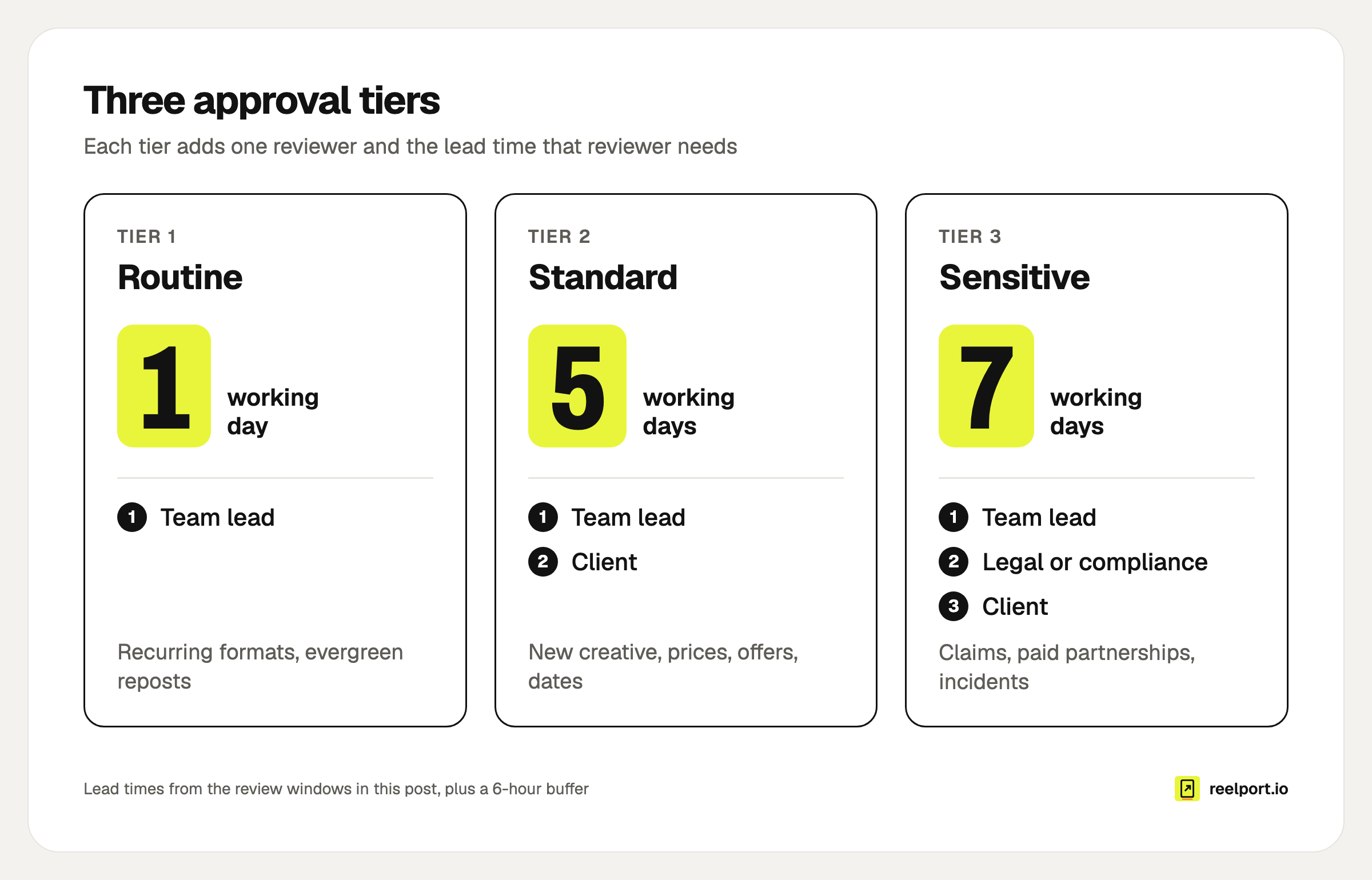
Each tier adds one reviewer and the lead time that reviewer needs.
How long should a social media approval workflow take?
Count backwards from the publish time. Add a buffer, every review window and one revision round, and you get the latest moment a draft can be handed in. With the windows below that is one working day for Tier 1, five for Tier 2 and seven for Tier 3, each plus a six-hour buffer.
The windows are a starting point you should adjust to your own team. What matters is that they are written down and that the sum is known.
| Step | Tier 1 | Tier 2 | Tier 3 |
|---|---|---|---|
| Internal review | 1 day | 1 day | 1 day |
| Legal or compliance review | none | none | 2 days |
| Client review | none | 2 days | 2 days |
| Revision by the author | same day | 1 day | 1 day |
| Re-check of the revision | none | 1 day | 1 day |
| Lead time in working days | 1 | 5 | 7 |
| Buffer before publishing | 6 hours | 6 hours | 6 hours |
The formula:
Draft due = publish time − buffer − all review windows − revision window − re-check window
A worked example
This is an invented example: an agency called Northside Studio schedules a Tier 2 post for its client, a bakery, for Thursday at 18:00.
- Thursday 18:00: publish time.
- Thursday 12:00: final approval is due. That is the six-hour buffer.
- Wednesday 12:00: the revised post goes back to the client, who has one working day to re-check it.
- Tuesday 12:00: the client's feedback is due, and the author has one working day to revise.
- Friday 12:00: the post goes to the client, who has two working days (the weekend does not count).
- Thursday 12:00, the week before: the draft is due for the one-day internal review.
1 + 2 + 1 + 1 = 5 working days, plus the buffer. A post for Thursday evening has to be drafted by noon on the Thursday before.
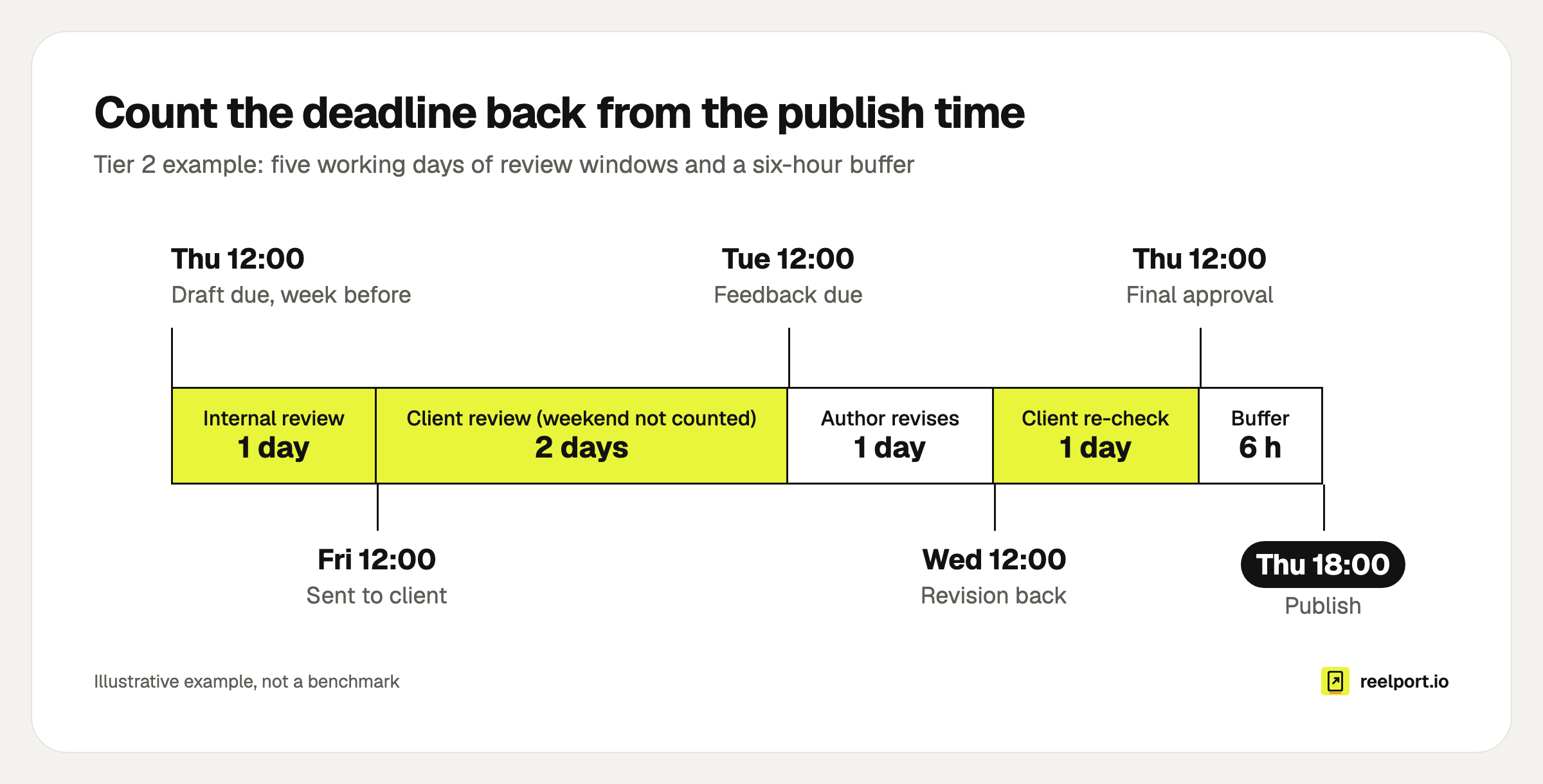
The Tier 2 example: five working days of windows and a six-hour buffer.
If the post is approved without changes, it is done on Tuesday and the two revision days become slack. Do not plan with that slack. Put the "draft due" date into your social media content calendar next to the publish date, so the deadline is visible to the person who has to meet it.
How do you set up the workflow step by step?
Write the rules on one page, then put them into the tool you publish with. The page takes about an hour, and the order matters because each step depends on the one before.
- List channels and content types. One line per combination that behaves differently, for example "Instagram Reels, client A" or "LinkedIn, founder's profile".
- Assign a default tier to each line. Recurring formats start in Tier 1 once their first edition has passed Tier 2.
- Name one approver and one deputy per step. A name, not a department. The deputy takes over when the approver is away or the window runs out.
- Set the review windows and work out the lead time per tier, as in the table above.
- Decide the silence rule. For Tier 2 and 3: no answer means the post does not go out. It moves to the next free slot and the deputy is asked. "Approved unless you object" is only acceptable for Tier 1, and only if the client has agreed to it in writing.
- Decide the edit rule. Any change to an approved post, including a typo fix in the caption or a swapped cover, sends it back for approval. A typo fix is approved in a minute. An unapproved "small edit" is how a wrong price goes live.
- Put it into your tool. Give drafters a role that cannot publish, give approvers one that can, and send clients a review link instead of a login.
- Review after four weeks with the numbers in the last section of this post.
In reelport.io, step 7 is a setting per member and channel: no access, can draft (needs approval) or can publish. A post from someone who can only draft waits under Queue › Approvals, and nothing goes out while it waits, even when its time passes. If that person edits the post after approval, it waits for approval again. The details are on the team approvals page.
What should an approver check before signing off?
An approver checks the things a drafter is too close to see: facts, rights, the destination and the fit with everything else going out that day. Ten checks cover most mistakes that reach the public. Copy this list into your review request so that "looks good" means the same thing every time.
APPROVAL CHECKLIST

[ ] Facts: every price, date, number and name matches its source
[ ] Offer: terms, end date and conditions are stated or linked
[ ] Link: the link opens the right page, on a phone
[ ] Rights: we may use every image, clip and piece of music
[ ] People: everyone shown or named has agreed to it
[ ] Disclosure: paid or gifted content is labelled as such
[ ] Tags: @handles and hashtags point where we think they do
[ ] Per channel: caption, cover and crop are right on each network
[ ] Timing: nothing else that day makes this post look wrong
[ ] Tier: the post is in the right tier for what it says
The "per channel" line matters more than it looks. A caption that fits Instagram can be cut off elsewhere, and a mention that links on one network is plain text on another. If you cross-post to several networks, the approver has to see each channel's version, not only the first.
How do you ask for feedback that you can act on?
Ask for a decision, give a deadline and tell the reviewer what happens if they miss it. Vague requests get vague answers ("can we make it pop more?"), and every vague answer costs you a revision round. Three short messages do most of the work.
The review request
Subject: For approval by Tue 12:00: 3 posts for next week

Hi [name],

3 posts are ready for your review: [link]

Please approve or request changes on each one by Tuesday 12:00.
They are scheduled for Thu 18:00, Fri 09:00 and Sat 12:30.

If I have no answer by then, I will move them to the following
week and ask [deputy] to step in. Nothing goes out unapproved.

What I need you to check: prices, the offer end date, the link.
The change request (ask reviewers to use this shape)
Post:     Thursday reel
Where:    Caption, line 2 / video at 0:14
Change:   "from €4.90" should read "€4.90"
Why:      The price is fixed, "from" is misleading
Must-fix or nice-to-have: must-fix
The rejection
Not approved: Thursday reel.
Reason: the offer ends on Wednesday, so the post would go out
after it is over.
What would make it approvable: a new date, or the offer extended.
Next step: [author] decides by Monday 12:00.
"Where" is the field people skip and the one that saves the most time. For video, a timestamp turns "the bit in the middle" into a ten-second fix.
Why do approval workflows break, and how do you fix them?
They break in a small number of predictable ways, and each has a structural fix. Reminding people to "be faster" is not one of them. Find your symptom in the table.
| Symptom | Usual cause | Fix |
|---|---|---|
| Posts go out late or are skipped | No silence rule, so everyone waits | Fixed window, deputy takes over, post moves to the next slot |
| Three reviewers, three contradicting sets of changes | Reviews run in parallel | Review in sequence, and name one person who decides |
| "Final" version changes after sign-off | Edits do not reset approval | Any edit sends the post back, enforced by the tool |
| Approver waves everything through | Too many low-risk posts in the queue | Move recurring formats to Tier 1 |
| Feedback arrives by email, chat and phone | No single place for comments | Comments live on the post, other channels get a link back |
| Client approves a screenshot, the live post differs | The client never saw the real post | Share the post itself, per channel, with its time |
How do you know the workflow is working?
Track four numbers per month, all from the post history. They tell you whether the workflow is slow, whether briefs are unclear and whether deadlines are realistic. There is no universal benchmark worth quoting, so use the first month as your baseline and watch the direction.
| Metric | How to calculate | What it tells you |
|---|---|---|
| First-pass approval rate | Posts approved without changes ÷ posts sent for approval | Whether briefs and tiers are clear |
| Revision rounds per post | Change requests ÷ posts sent for approval | Whether feedback is specific |
| Posts moved for late approval | Posts rescheduled because a window ran out ÷ posts sent | Whether windows and deputies work |
| Edits after approval | Approved posts that were edited again | Whether the edit rule is respected |
An invented month to show the arithmetic: 40 posts sent for approval, 28 approved without changes, 15 change requests in total, 3 posts moved. That is a first-pass rate of 28 ÷ 40 = 70%, 15 ÷ 40 = 0.38 revision rounds per post and 3 ÷ 40 = 7.5% moved. If the first-pass rate falls, look at the briefs before you blame the reviewers.
Where reelport.io fits
reelport.io has the approval step built into publishing. Teams have owner, admin and member roles, and each member's access is set per channel, so the same person can draft for one brand and publish for another. Approvers can approve, request changes with a note or reject, and each step is kept in the post's history.
For clients, owners and admins create a review link that works without an account and for 1 to 30 days. The client sees each post as it will go out, with the caption per channel and the time, and can comment, ask for changes and, if you allow it, approve. The same kind of link works for an outside reviewer who should comment but not approve.
One limit to know: reelport.io has one approval step plus the client link, not a chain of several required approvers. For Tier 3, run the legal review through a comment-only link first and let the approver sign off after it. Webhook events for pending, approved, changes requested and rejected posts are available for integrations such as Zapier, Make and n8n.
Extra teams, one per client, come with the Agency plan at $119 a month. The agency page and the pricing page have the details, and the Pro trial runs 14 days without a card.