
To cross post to multiple social media platforms without losing reach, export one clean vertical master file with no app watermark, upload it natively to each network, and change only what each network treats differently: caption length, hashtags, mentions, title and privacy settings. A 9:16 clip between 3 seconds and 3 minutes is accepted as an Instagram Reel, a YouTube Short and a Threads video. The limits below are taken from each platform's own documentation, checked in November 2026.
What is the best way to cross post to multiple social media platforms?
The best way to cross post to multiple social media platforms is to treat the video as shared and the text as per-network. Keep one master file that fits the strictest limit you publish to, write one core message, then cut a version of the caption for each network before anything is scheduled.
In practice that is six steps:
- Export the clip from your editor as a clean file: 1080 × 1920, no watermark, no baked-in platform stickers.
- Check the file against the length and size limits of every network on your list (table below).
- Write the core message once, in two sentences, with the one action you want.
- Cut a caption per network from that core, starting with the shortest limit.
- Fill in what only one network asks for: a YouTube title, TikTok's audience setting, a Threads topic tag.
- Schedule each version at that network's own time, then check after publishing that each one is live and public.
Steps 2, 4 and 5 are where cross-posts break, so the rest of this post gives you the numbers for each.
Which video file works on every network?
A vertical 9:16 video at 1080 × 1920, between 3 seconds and 3 minutes long, works as an Instagram Reel, a YouTube Short and a Threads video. Keep it at 60 seconds or less if the same file should also run as an Instagram Story, and under 99 MB if you post it to Mastodon.
| Network and format | Length | File size | Shape | Source |
|---|---|---|---|---|
| Instagram Reels (published through the API, which is how scheduling tools post) | 3 seconds to 15 minutes | 300 MB | 9:16 recommended | Meta |
| Instagram Stories | 3 to 60 seconds | 100 MB | 9:16 recommended | Meta |
| YouTube Shorts | up to 3 minutes | not stated | square or vertical | YouTube Help |
| Threads video | up to 5 minutes | 1 GB | 9:16 recommended | Meta |
| Mastodon video | not stated | 99 MB in Mastodon's own documentation | not stated | Mastodon |
| TikTok (published through the API) | 3 minutes for every account, 5 or 10 minutes for some | 4 GB | not stated | TikTok |
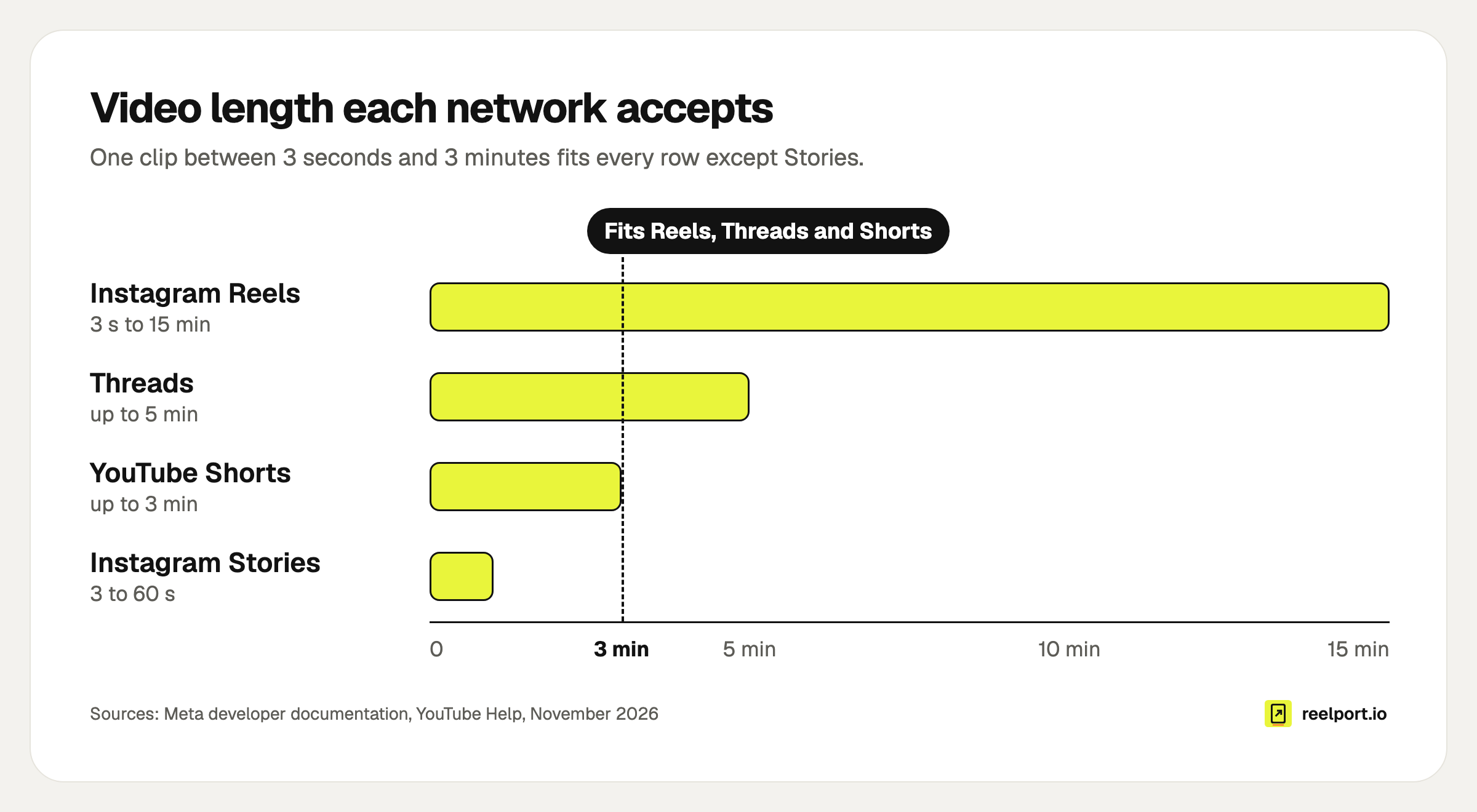
A clip of up to 3 minutes fits Reels, Threads and Shorts; only Stories need 60 seconds or less.
Two details in that table catch people out.
YouTube decides what a Short is by shape and length, and you cannot tick a box for it. A square or vertical upload of up to three minutes becomes a Short; YouTube suggests a wider ratio such as 16:9 if you want a normal video instead. A 3 minute 10 second vertical clip therefore lands among your long videos.
File size limits turn into a bitrate ceiling once you know the length. The arithmetic is megabytes × 8 ÷ seconds:
- Mastodon, 99 MB, 3-minute clip: 99 × 8 ÷ 180 = 4.4 Mb/s. That is low for 1080p, so shorten the clip or export a second, smaller file for Mastodon.
- Instagram, 300 MB, 3-minute clip: 300 × 8 ÷ 180 = 13.3 Mb/s.
If your text or logo sits near the edges, check it against each app's interface before you export. The safe zones tool lays the Instagram and TikTok interface over your own photo or video, so you see what the buttons and caption cover.
How long can the caption be on each network?
Caption limits run from 100 characters for a YouTube title to 5,000 bytes for a YouTube description. Instagram and TikTok both allow 2,200 characters, LinkedIn 3,000, Threads 500 and Mastodon 500 by default. A caption written for Instagram will be rejected or cut on Threads and Mastodon.
| Network | Text limit | What else counts | Source |
|---|---|---|---|
| 2,200 characters | at most 30 hashtags and 20 @ tags | Meta | |
| TikTok | 2,200 characters (counted as UTF-16) | hashtags and mentions are part of the caption | TikTok |
| YouTube | title 100 characters, description 5,000 bytes | tags 500 characters in total | |
| 3,000 characters | LinkedIn Help | ||
| Threads | 500 characters | one topic tag per post, at most 5 links | Meta |
| Mastodon | 500 characters by default (your server can differ) | every link counts as 23 characters; only the username part of a mention counts | Mastodon |
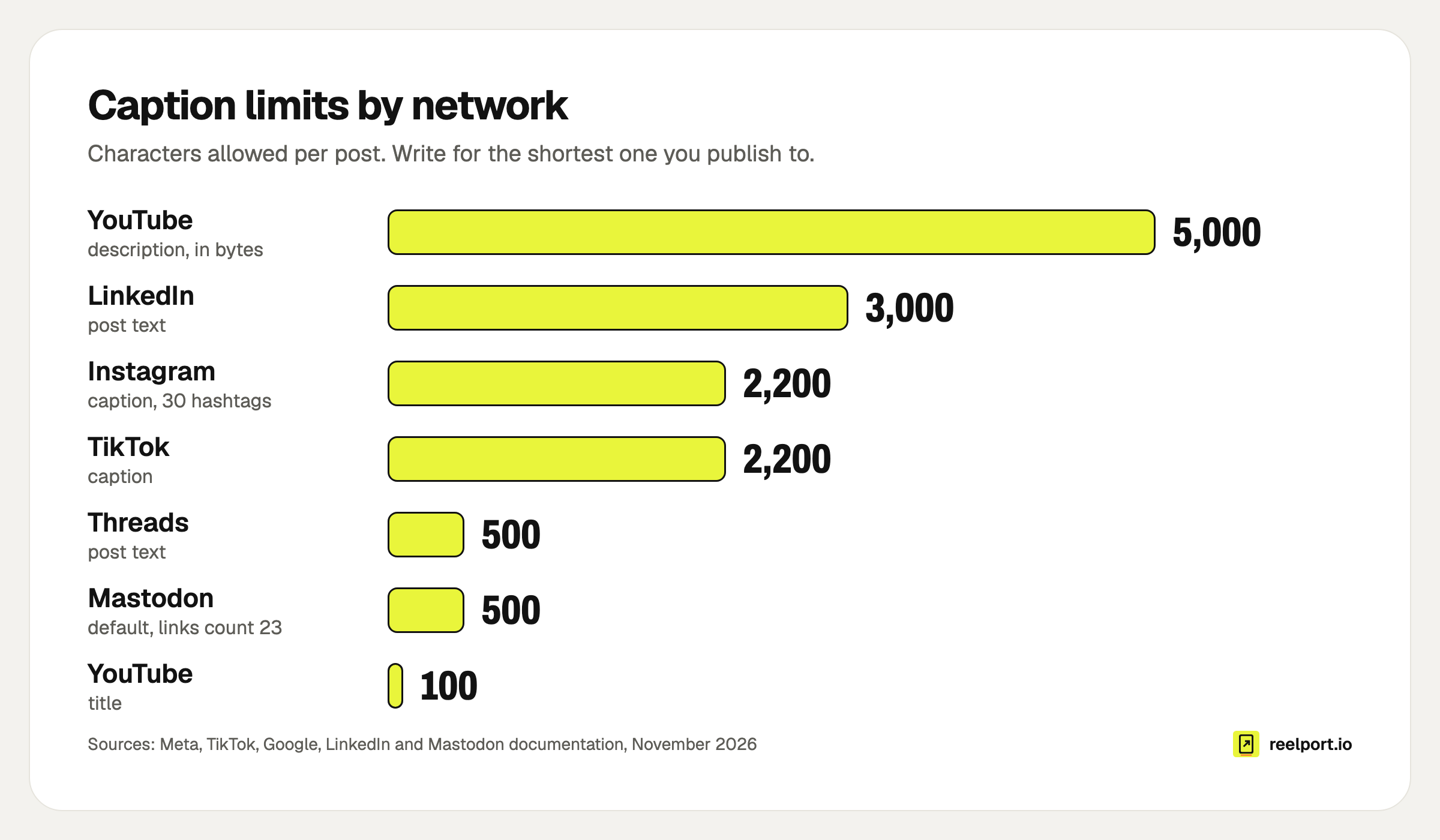
The gap between 2,200 and 500 characters is why one caption for every network fails.
Pinterest, Facebook Pages, Bluesky and Google Business Profile have limits of their own that are not verified here: read the counter in each network's composer before you paste.
What should you change for each network?
Change the text and the settings, and leave the video alone. Each network needs its own caption length, hashtag style, handles and one or two fields that exist nowhere else, such as YouTube's title or TikTok's audience choice. The picture stays identical, which keeps the work to a few minutes per post.
Hafenrost is an invented coffee roaster used here as a worked example. The clip is 42 seconds long, 9:16, exported at 12 Mb/s, so the file is about 42 × 12 ÷ 8 = 63 MB and fits every row of the file table, Stories and Mastodon included.
The core message: sour espresso means the grind is too coarse; go two steps finer and aim for 36 g out in 28 seconds.
| Network | What changed | Characters used | Limit |
|---|---|---|---|
| Hook as a question, a "save this" line, three hashtags at the end | 184 | 2,200 | |
| TikTok | One line, two hashtags, audience set to Everyone by hand | 88 | 2,200 |
| YouTube | A title with the promise and the length, the link in the description | 58 title, 151 description | 100 and 5,000 bytes |
| Threads | No hashtags, ends on a question, one topic tag | 153 | 500 |
| Mastodon | Link in the text, hashtags with capital letters, a description of the video for people who cannot see it | 136 (the link counts as 23) | 500 |
| Four short paragraphs from the roaster's point of view, no hashtags | 361 | 3,000 |
Three of those versions in full, so you can see how far they drift from each other:
INSTAGRAM (184)
Sour espresso? Your grind is too coarse. Go two steps finer, aim for
36 g out in 28 seconds, then taste again. Save this for your next bag
of beans.

#espresso #homebarista #coffeetips

YOUTUBE TITLE (58)
Fix sour espresso in 42 seconds: grind finer, 36 g in 28 s

MASTODON (136)
Sour espresso? Grind two steps finer and aim for 36 g out in 28
seconds. Full brew guide: https://example.com/guide #Espresso
#HomeBarista
What to adapt, network by network:
- Handles. @hafenrost on Instagram may belong to someone else on TikTok. Rewrite or remove every mention per network.
- Hashtags. Instagram accepts up to 30, Threads takes one topic tag. On Mastodon, capitalise each word (#HomeBarista) so screen readers can read it.
- Links. Put the link where the network turns it into something people can tap, and check that in each app's preview before you schedule. Mastodon counts every link as 23 characters and Threads allows up to 5 per post. On YouTube, description links are only clickable if the channel meets YouTube's requirements, such as channel verification.
- Calls to action. "Save this" belongs on Instagram, "Subscribe" on YouTube. "Link in bio" on LinkedIn tells readers the post was pasted.
- Network-only fields. YouTube needs a title. TikTok requires you to choose who can watch, and apps that post for you must show your account's own options and respect your choice.
In reelport.io you write the shared caption once and then give any channel its own caption and options in the same post, so the six versions above live in one place and go out from one queue.
Does cross-posting hurt your reach?
Posting your own video to several networks does not hurt reach by itself. What the platforms say they hold back is recycled-looking material: Instagram makes watermarked and low-resolution reels less visible, and TikTok keeps unoriginal or reused content without anything new out of the For You feed.
The exact wording matters, because most advice on this point is second-hand:
- Instagram: in its explanation of how ranking works, Adam Mosseri writes that Instagram aims to make certain reels less visible, "such as low-resolution or watermarked reels".
- TikTok: the Community Guidelines say content is ineligible for the For You feed "if it includes unoriginal or reused material without anything new".
Both rules judge what the upload looks like, and neither mentions where else the video lives. So the practical rules are short:
- Never download your own post from one app and upload it to another. The download carries that app's watermark and a second round of compression.
- Upload the master file from your editor to every network.
- Keep stickers, captions and music that one app burns into the picture out of the master. Add them per network, or leave them out.
None of the official pages cited here says that publishing the same video on several networks is penalised, so treat claims about cross-platform "duplicate content penalties" with care.
Why did a cross-posted post fail or go out wrong?
Most failed cross-posts come down to one limit that differs between networks: text that is too long, a file outside the length window, a setting one network requires, or a daily cap. Find your symptom in the table, fix the cause, and send only that network's version again.
| Symptom | Likely cause | Fix |
|---|---|---|
| The post went out on Instagram but was refused on Threads or Mastodon | Caption over 500 characters | Cut a short version first, then expand it for the others |
| Your YouTube upload sits among long videos, not Shorts | Longer than 3 minutes, or not square or vertical | Trim to 3 minutes or less and export 9:16 |
| The TikTok post is visible only to you | The app you posted with has not passed TikTok's audit; TikTok restricts such posts "to private viewing mode" | Check your tool's TikTok status before you rely on it |
| The reel reaches followers but not much further | A watermark from another app, or a low-resolution re-upload | Upload the clean master file |
| TikTok analytics say the video is not eligible for the For You feed | Flagged as unoriginal or reused | Post your own original cut and appeal in the app if the flag is wrong |
| Instagram refuses the photo version | Feed images must be JPEG, between 4:5 and 1.91:1, at most 8 MB | Crop to 4:5 and export as JPEG |
| Instagram stops accepting posts from your tool late in the day | An account can publish 100 posts through the API in a rolling 24 hours; Threads allows 250 | Spread a bulk upload over two days |
| The Mastodon post is over the limit although the text looks short | Each link counts as 23 characters, however short it is | Count links as 23 each |
reelport.io runs these checks when you schedule, before the post is due: caption length per network, 30 hashtags on Instagram, Instagram's photo ratio, file type and size, video length, and a warning when a YouTube upload is too long or too wide to count as a Short. If one network refuses a post, the others still go out, and the queue shows the reason for the one that did not.
Should every network get the post at the same time?
No. Publish each version when that network's audience is around; nothing in the rules cited above rewards identical timestamps. Staggering also lets you fix a mistake after the first network instead of repeating it on six.
- Start with the network where you have the most followers, at its best hour. For Instagram, see how to find your best time to post.
- Send the other short-video networks later that day or the next morning. The steps are in how to schedule Instagram Reels and how to schedule TikTok videos.
- Post to text-first networks (Threads, Mastodon, LinkedIn) once you have seen which line people reacted to.
A cross-posting checklist you can copy
Paste this into your notes or project tool and tick it per post.
MASTER FILE
[ ] Exported from the editor, never downloaded from an app
[ ] 1080 x 1920, 9:16, no watermark, no burned-in app stickers
[ ] 3 seconds to 3 minutes (60 seconds or less if it is also a Story)
[ ] Under 300 MB for Instagram (under 99 MB if it goes to Mastodon)
[ ] Text and logo inside the safe zones

CAPTIONS
[ ] Core message written once, in two sentences
[ ] Threads and Mastodon version: 500 characters or less, links counted as 23 on Mastodon
[ ] Instagram: 2,200 characters, at most 30 hashtags and 20 @ tags
[ ] TikTok: 2,200 characters
[ ] YouTube: title 100 characters or less, link in the description
[ ] LinkedIn: 3,000 characters or less, no "link in bio"
[ ] Handles checked on every network
[ ] Call to action matches the network

SETTINGS
[ ] TikTok: who can watch, comments, duet, stitch, brand disclosure
[ ] YouTube: title, visibility, made for kids
[ ] Threads: one topic tag
[ ] Alt text or a video description where the network offers it

AFTER PUBLISHING
[ ] Each post is live and public (open the link logged out)
[ ] YouTube filed it as a Short
[ ] First comment or link added where planned
Where reelport.io fits
reelport.io is one workspace for publishing to Instagram, Facebook Pages, TikTok, YouTube, Pinterest, Google Business Profile, LinkedIn, Threads and Mastodon. One post holds the media, a shared caption and a separate caption and options for every channel, and the limits above are checked before you schedule. Posts are published from servers in the EU at the scheduled minute, so your computer can be off.
Some networks only open full access after reviewing an app. Until TikTok has approved reelport.io, TikTok posts can only be private; Pinterest Pins stay visible only to you until Pinterest grants Standard access; LinkedIn Company Pages and Google Business Profile wait on their own approvals. Each page under channels says where that stands today. Plans start at $0, and the 14-day Pro trial needs no card: see pricing.