
The size that every published limit in this guide allows is 1080 × 1920 pixels (9:16), exported as an MP4 with H.264 video and AAC audio at 30 frames per second. Social media video sizes differ far less in pixels than in length and file size: the same file can be fine for an Instagram Reel and too long for a Facebook Reel, or too heavy for Mastodon. The table below lists each limit with a link to the platform's own documentation.
Most cheat sheets copy numbers from each other without a source. Every limit here comes from a page you can open and check, and where a network publishes no number, this guide says so.
What are the social media video sizes for each network?
Vertical 9:16 at 1080 × 1920 is recommended or allowed by every limit the networks publish. What changes is the allowed length, the file size and a few container rules. The numbers for Instagram, Facebook and Threads are the limits for posts sent through their publishing APIs, which is what any scheduling tool is held to.
| Placement | Shape and size | Length | File size | Source |
|---|---|---|---|---|
| Instagram Reels | 9:16 recommended, at most 1920 px wide, 23 to 60 fps | 3 seconds to 15 minutes | 300 MB | Meta |
| Instagram Stories | 9:16 recommended, at most 1920 px wide | 3 to 60 seconds | 100 MB | Meta |
| Facebook Reels | 9:16, 1080 × 1920 recommended, at least 540 × 960, 24 to 60 fps | 3 to 90 seconds | not stated | Meta |
| TikTok | 360 to 4096 px on each side, 23 to 60 fps | up to 10 minutes by API, depending on the account | 4 GB | TikTok |
| YouTube Shorts | square or vertical | up to 3 minutes | not stated | YouTube |
| 256 × 144 to 4096 × 2304, ratio 1:2.4 to 2.4:1, 10 to 60 fps | 3 seconds to 10 minutes | 75 KB to 5 GB | ||
| square or vertical (2:3, 4:5 or 9:16) recommended | 4 seconds to 15 minutes | 2 GB | ||
| Threads | 9:16 recommended, at most 1920 px wide, 23 to 60 fps | up to 5 minutes | 1 GB | Meta |
| Mastodon | MP4, M4V, MOV or WebM, one video per post | not stated | 99 MB | Mastodon |
| Google Business Profile | 720p or higher | up to 30 seconds | 75 MB | |
| Bluesky | not stated | not stated | not stated; a verified email is required and video posts have a daily limit | Bluesky |
Four details in that table catch people out:
- Instagram and Threads cap the width at 1920 pixels. A 4K export (2160 × 3840 vertical or 3840 × 2160 landscape) is over the limit. Export at 1080 wide.
- LinkedIn does not take MOV. Its help page says it no longer supports AVI, QuickTime or MOV files. An iPhone clip saved as MOV has to become an MP4 first.
- TikTok's length depends on your account. TikTok's documentation says all creators can post 3-minute videos and some can post 5 or 10 minutes.
- Mastodon transcodes hard. Videos are converted to H.264 with a maximum bitrate of 1,300 kbps, so fine detail and small text get soft whatever you upload.
For ads, every network has separate specifications. This guide covers organic posts.
Which aspect ratio should you use for which placement?
Use 9:16 for anything that plays in a full-screen vertical feed, and 16:9 only for YouTube long-form and LinkedIn. Square and 4:5 are optional extras for feeds that show posts between other posts. YouTube is the one network where the shape changes what the video is: a square or vertical video up to three minutes is a Short, and anything wider is a regular video.
| Shape | Pixels | Use it for | Avoid it for |
|---|---|---|---|
| 9:16 vertical | 1080 × 1920 | Reels, Stories, TikTok, Shorts, Threads, Pinterest | YouTube long-form |
| 4:5 portrait | 1080 × 1350 | Pinterest, LinkedIn and Threads feeds | Stories and Reels, where it leaves blank space |
| 1:1 square | 1080 × 1080 | Pinterest, LinkedIn, and Shorts if you must | Reels and TikTok |
| 16:9 landscape | 1920 × 1080 | YouTube long-form, LinkedIn | Shorts (it will not count as one), Reels |
YouTube calls 16:9 the standard aspect ratio for its player on a computer in its encoding guide. Instagram accepts almost any ratio for Reels but recommends 9:16 "to avoid cropping or blank space".
How long can a video be on each network?
From 30 seconds on Google Business Profile to 15 minutes on Instagram Reels and Pinterest. Length is the limit that most often stops one file from going everywhere, because the short placements are much shorter than the long ones: a Facebook Reel ends at 90 seconds, a YouTube Short at 3 minutes.
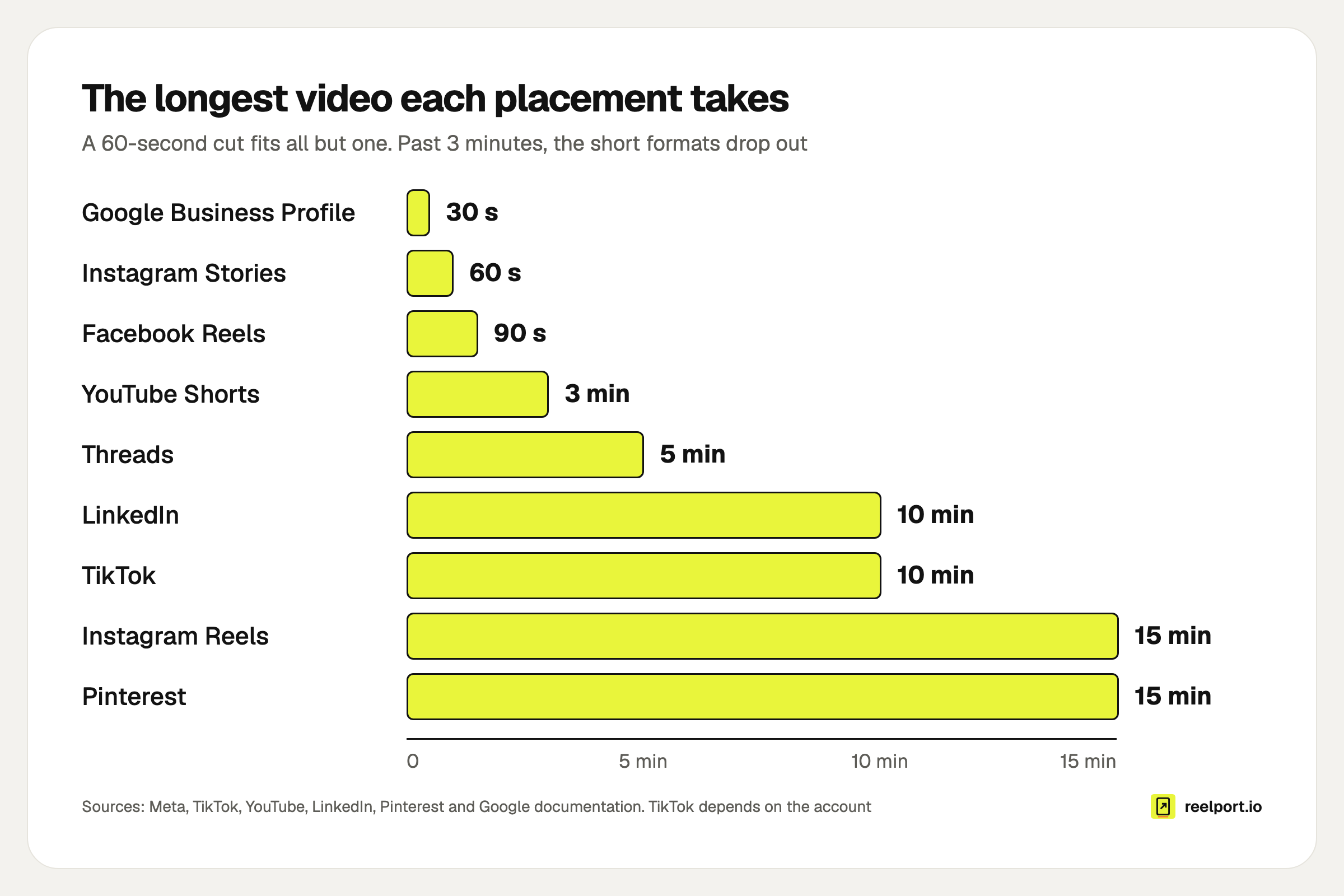
The longest video each placement takes, from the sources in the table above.
Read the chart as a set of cut-offs:
- Up to 60 seconds fits every placement except Google Business Profile.
- Up to 90 seconds drops Instagram Stories.
- Up to 3 minutes drops Facebook Reels as well. It still counts as a YouTube Short and fits every TikTok account.
- Longer than 3 minutes becomes a regular YouTube video and needs a TikTok account with a longer limit.
On YouTube, the three-minute rule applies to square or vertical videos uploaded after 15 October 2024. If your cut runs 3:05, trim five seconds.
Can one master file cover every network?
Yes for vertical placements, if you frame for it. Shoot or design at 1080 × 1920 and keep everything that matters inside the central 1080 × 1080 square. That file posts as it is to every 9:16 placement, and it crops to 4:5 and 1:1 without losing the subject. It does not crop to 16:9.
The arithmetic for a 1080 × 1920 master:
| Target | Kept | Cut away | Share of the frame kept |
|---|---|---|---|
| 9:16 | 1080 × 1920 | nothing | 100% |
| 4:5 | 1080 × 1350 | 285 px top and 285 px bottom | 70% |
| 1:1 | 1080 × 1080 | 420 px top and 420 px bottom | 56% |
| 16:9 | 1080 × 608 | 656 px top and 656 px bottom | 32% |
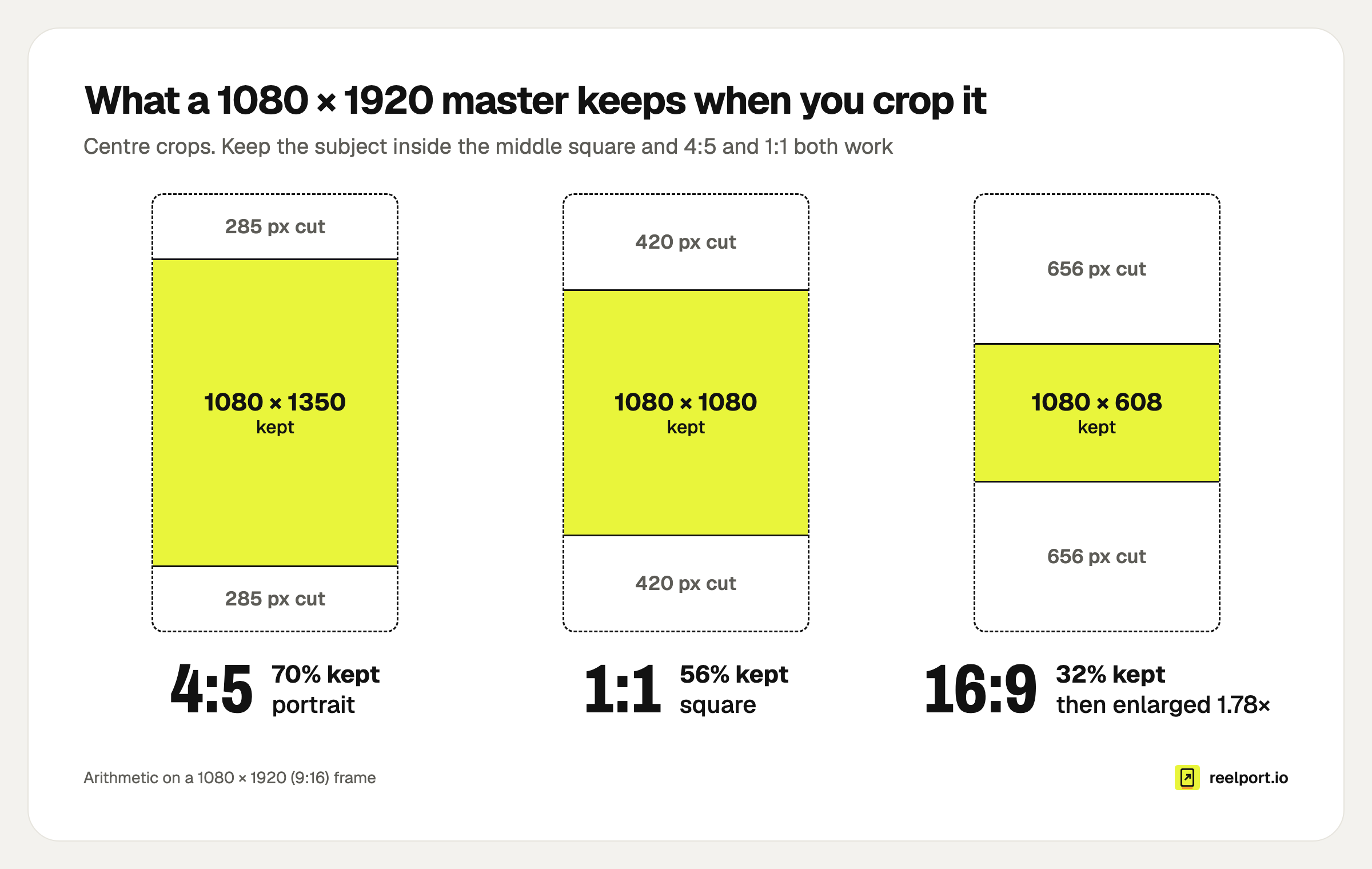
What survives when a 1080 × 1920 master is cropped from the centre.
The 16:9 crop keeps about a third of the picture and then has to be enlarged 1.78 times to fill 1920 × 1080, which looks soft. The same happens in reverse: a 9:16 crop from a 1920 × 1080 landscape clip is only 608 pixels wide.
If you need both shapes from one shoot, film landscape in 4K. A 9:16 crop from 3840 × 2160 is 1215 × 2160, which scales down cleanly to 1080 × 1920. Then export each version at 1080 or 1920 wide, because of the 1920-pixel cap above.
A quick test before you export: an on-screen title placed 200 px from the top of a vertical frame is gone in the 4:5 version, because that crop starts at 285 px. Move it below 420 px and it survives the square crop too.
How big will the file be?
File size is bitrate times length. Multiply the total bitrate in megabits per second by the length in seconds and divide by eight to get megabytes. At 8 Mbps, which YouTube recommends for 1080p at 24 to 30 fps, a one-minute video with 128 kbps audio is about 61 MB.
Size in MB = (video Mbps + audio Mbps) × seconds ÷ 8
Worked through for a total of 8.128 Mbps (8 Mbps video plus 0.128 Mbps audio):
| Length | File size | Mastodon (99 MB) | Instagram Stories (100 MB, 60 s) | Instagram Reels (300 MB) |
|---|---|---|---|---|
| 30 seconds | 30 MB | fits | fits | fits |
| 60 seconds | 61 MB | fits | fits | fits |
| 90 seconds | 91 MB | fits | too long | fits |
| 3 minutes | 183 MB | too big | too long | fits |
| 5 minutes | 305 MB | too big | too long | too big |
Two things follow from the formula:
- Instagram's 15 minutes and 300 MB do not go together at high quality. A 15-minute Reel has to average about 2.7 Mbps to stay under 300 MB (300 × 8 ÷ 900). At Instagram's maximum of 25 Mbps you reach 300 MB after 96 seconds.
- Editor presets are often heavier than you need. A 20 Mbps export of a 60-second clip is about 151 MB: fine for Reels, over the limit for Stories and Mastodon.
What export settings work everywhere?
MP4, H.264, 1080 × 1920, a constant 30 fps and AAC stereo audio at 48 kHz. Each of those values sits inside every range in the table above, and Meta's Reels guide asks for this kind of file: progressive scan, a fixed frame rate and 4:2:0 chroma subsampling. Copy this into your editor's export preset:
Container:      MP4 (not MOV, LinkedIn no longer supports it)
Video codec:    H.264, progressive, 4:2:0
Resolution:     1080 x 1920 (9:16)
Frame rate:     30 fps, constant
Video bitrate:  8 Mbps (12 Mbps at 60 fps)
Audio:          AAC, stereo, 48 kHz, 128 kbps
Length:         under 60 s for every placement,
                under 90 s without Stories,
                under 3 min without Facebook Reels
File size:      under 99 MB if Mastodon is on the list
If your footage is 24, 25 or 60 fps, keep it. YouTube asks you to upload in the frame rate you recorded, and every frame-rate range in the table includes 24 to 60 fps. Screen recordings from phones often have a variable frame rate, so re-export those with a constant one.
Why was my video upload rejected?
Usually because of length, container or width. The error message does not always say which, so match your symptom to the cause.
| Symptom | Likely cause | Fix |
|---|---|---|
| LinkedIn refuses the file | MOV container | Re-export or re-wrap as MP4 |
| Instagram or Threads refuses a sharp, short clip | Wider than 1920 px (a 4K export) | Export at 1080 px wide |
| Instagram refuses a long Reel | Over 300 MB | Lower the bitrate using the formula above |
| Facebook Reel fails, Instagram Reel works | Longer than 90 seconds, or smaller than 540 × 960 | Trim, or post it as a regular Page video |
| Story fails | Longer than 60 seconds or over 100 MB | Cut into parts of up to 60 seconds |
| A Short appears as a normal YouTube video | Longer than 3 minutes, or wider than square | Trim, or crop to square or vertical |
| TikTok refuses the length | Over your account's maximum | Trim to 3 minutes, which every account can post, or to your account's longer limit |
| Mastodon refuses the file | Over 99 MB | Lower the bitrate or shorten it |
| Blank space around a Reel | Not 9:16 | Reframe to 1080 × 1920 |
| Facebook Reel fails with no clear reason | Variable frame rate or interlaced footage | Re-export progressive at a constant frame rate |
reelport.io runs these checks when you schedule instead of when the post fails: file type and size, video length, the number of media per network and your TikTok account's longest allowed video. The composer also warns you when a YouTube video is longer than three minutes or landscape, because it will not count as a Short. The publishing page lists what each channel takes.
What about safe zones?
A correct size does not mean everything is visible. Every vertical feed lays the account name, the caption and a column of buttons over the picture, mostly along the bottom and the right edge. None of the documents linked in the table gives pixel margins for these overlays, and the layouts change with app updates.
So check by eye instead of trusting a fixed percentage. The free safe zones tool puts each network's interface over your own photo or video in the browser. Its zones come from creator guides, not official specifications, and your file stays on your device. Keeping text inside the central square from the crop section also helps, because the square ends 420 px above the bottom edge.
Where reelport.io fits
reelport.io publishes one video to Instagram, Facebook Pages, TikTok, YouTube, Pinterest, LinkedIn, Threads and Mastodon from one composer, each channel with its own caption and options. It takes MP4 or MOV files up to 10 minutes and up to 1 GB, depending on your plan, and flags what a channel will refuse before you schedule. See all channels for the formats per network.
It does not edit or re-crop video. Export the shape you want from your editor first. If you cut in DaVinci Resolve Studio, the Reelport plugin renders a timeline as 9:16, 4:5, 1:1 or 16:9, with presets for Instagram, TikTok and YouTube Shorts, and uploads the file to your reelport.io team.
Two honest notes on network reviews: until TikTok has approved reelport.io's app, TikTok posts can only be private, and until Pinterest grants Standard access, Pins are visible only to you. The guides to scheduling Instagram Reels, scheduling TikTok videos and cross-posting to several networks pick up where this one ends.